Best Full-Motion Wall Mounts for 55-Inch TVs
The best full-motion wall mount for a 55-inch TV depends on its weight, VESA pattern, wall type, and how far you need the screen to move. Mounting Dream and USX MOUNT offer 32–70-inch options with broad motion and 99-pound limits; MOUNTUP suits a 55-inch TV within its 32–65-inch range; and Perlegear provides height settings for more precise placement. Check your TV and wall measurements before choosing.
| Mount | Best For | TV Size Range | Key Motion |
|---|---|---|---|
| Mounting Dream | Longer extension | 32–70 inches | 17.5-inch extension |
| USX MOUNT, 32–70 inches | 12- or 16-inch wood studs | 32–70 inches | 13.89-inch extension |
| MOUNTUP | Rooms with multiple viewing areas | 32–65 inches | ±45° swivel |
| Perlegear, 26–74 inches | Height adjustment | 26–74 inches | Three height settings |
| USX MOUNT, 26–65 inches | Wide swivel range | 26–65 inches | Up to ±90° swivel |
Mounting Dream Full Motion TV Wall Mount

This mount fits most 32–70-inch TVs weighing up to 99 pounds, with VESA patterns up to 400 × 400 mm. It is best for a 55-inch TV owner who wants substantial extension: the arm pulls out 17.5 inches and retracts to 3.4 inches. The mount tilts up 5° or down 15° and swivels to adjust the screen toward a seat.
Installation features include pre-labeled hardware, a paper template, and ±3° post-installation leveling. The listed fit is for standard 16-inch studs, so choose another option or verify an appropriate solution if your stud spacing differs.
USX MOUNT Dual-Arm 32–70-Inch Mount

Choose this USX MOUNT model if your 55-inch TV weighs no more than 99 pounds and you need mounting options for 12- or 16-inch wood studs. Its VESA range is 75 × 75 mm to 400 × 400 mm. The dual articulating arms extend 13.89 inches and retract to 2.59 inches; tilt is -12°/+5°, with left-or-right swivel.
The bracket is made of cold-rolled steel, according to the product details. The listing also describes installation on concrete or brick, but wall type and installation materials should be confirmed before mounting. Its extension is shorter than the Mounting Dream option.
MOUNTUP EconoMe Full Motion Mount

This mount is best for a 55-inch TV in a room where viewers sit in different places. It fits most 32–65-inch TVs up to 99 pounds, with VESA patterns from 100 × 100 mm to 400 × 400 mm. Its motion includes ±45° swivel, 5° upward tilt, 10° downward tilt, and ±3° leveling after installation.
The listing specifies installation on studs up to 16 inches apart and says not to install into drywall alone. Because its size range ends at 65 inches, it has less screen-size flexibility than the 32–70-inch models.
Perlegear Full Motion Mount With Height Settings
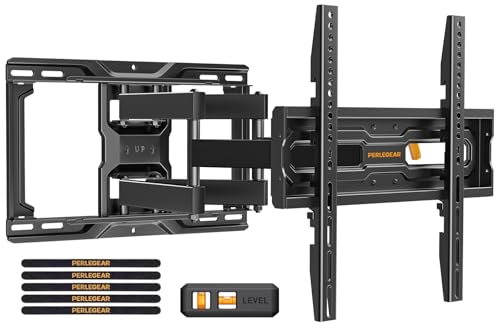
Choose this Perlegear mount if screen height is a priority, such as when positioning a TV around furniture or a soundbar. It offers three height configurations and fits TVs up to 99 pounds with VESA patterns from 100 × 100 mm to 400 × 400 mm. The listing describes fit for TVs up to 74 inches, including 55-inch models.
Its pre-assembled arms, divided hardware, and drilling template are intended to simplify installation. The listing specifies 12- or 16-inch wood studs, concrete, or brick; it says an extension bracket is needed if wood studs are more than 16 inches apart. Verify that the exact screen size and wall setup match the product instructions.
USX MOUNT With Wide Swivel Range

This is a better fit when a 55-inch TV needs to turn toward different seating positions. It supports most 26–65-inch TVs with VESA patterns from 75 × 75 mm to 400 × 400 mm. The mount tilts +5°/-15°, swivels up to ±90° depending on the TV, and allows ±5° post-installation leveling.
The listed installation surfaces are wood studs and solid concrete; the product warns against mounting into drywall alone. Concrete anchors are not included in the package, so check the installation requirements and obtain suitable anchors if needed.
Buying Guide: How To Choose A 55-Inch TV Mount
Will the mount fit your TV?
Check the TV’s weight without its stand and compare it with the mount’s stated capacity. Measure the VESA pattern: this is the horizontal and vertical distance between the mounting holes on the back of the TV. A 55-inch screen size alone does not confirm compatibility. The five options above list maximum VESA patterns of 400 × 400 mm or less, so check your TV’s pattern before purchasing.
What wall and stud spacing do you have?
Identify whether the wall is framed with wood studs, concrete, or brick, and locate the studs before drilling. These mounts are not intended for drywall alone. Stud spacing varies by model: some listings specify 12- or 16-inch wood studs, while Mounting Dream specifies standard 16-inch studs. Follow the selected mount’s instructions and use appropriate hardware for the wall.
How much movement do you need?
Choose a longer extension if the TV must pull away from the wall or turn around an obstacle. For seats spread across a room, compare the swivel range. Tilt can help angle the screen and reduce glare, while post-installation leveling helps correct minor alignment differences. Motion range can depend on the TV’s dimensions and nearby walls.
Is installation a DIY project?
Review the included instructions and hardware, and confirm that the wall plate can be secured to the required structure. A drilling template or pre-labeled hardware may help organize installation, but does not replace accurate measurements. If the wall material, stud location, or TV weight is uncertain, seek qualified installation assistance.
Frequently Asked Questions
Can a 55-inch TV use a 32–70-inch mount?
Yes, if the TV’s weight and VESA pattern fall within the mount’s stated limits and the wall installation matches its requirements.
Can I mount a TV directly to drywall?
The listed mounts warn against installation into drywall alone. Secure the mount to suitable studs or an approved solid wall surface, following its instructions.
What does full motion mean?
A full-motion mount uses articulating arms to move the TV away from the wall and typically allows swivel and tilt adjustments.
How do I check a TV’s VESA pattern?
Measure between the centers of the mounting holes on the back of the TV, horizontally and vertically, then compare both measurements with the mount’s supported VESA range.