Best Adjustable Desktop Monitor Stands for a Clean, Ergonomic Setup
Discover the top adjustable monitor stands that help you customize height, reduce neck strain, and reclaim desk space. This guide highlights five versatile stands compatible with a range of screens, from compact laptops to multi-monitor configurations. Each option emphasizes durability, ergonomic benefits, and space efficiency to support a productive American home or office. Below is a quick overview of the selected products.
| Product | Brand | Key Benefit |
|---|---|---|
| Across-Star Dual-Monitor Stand | Across-Star | Extends from 32″ to 40″ for two screens |
| Hemudu Free-Standing Monitor Stand | Hemudu | Single monitor with versatile height and tilt |
| WALI Monitor Stand | WALI | Under-desk storage with height-adjustable riser |
| TAVR Dual Monitor Stand Riser | TAVR Furniture | Three-shelf, extra-long with dual/three-monitor capacity |
| BoYata Monitor Stand | BoYata | Adjustable height with sturdy metal build |
Across-Star Dual-Monitor Stand Riser

The Across-Star adjustable length monitor stand is designed for two screens, with a retractable range from 32 inches to 40 inches. It helps maximize desk space by allowing a compact setup when only one monitor is used and expands to accommodate two displays for productivity. The stand also provides an organized area underneath for a keyboard and other essentials, creating a tidier workspace. Its ergonomic design aims to position two monitors at a comfortable eye level to reduce neck and back discomfort.
Hemudu Single LCD Monitor Free-Standing Desk Stand
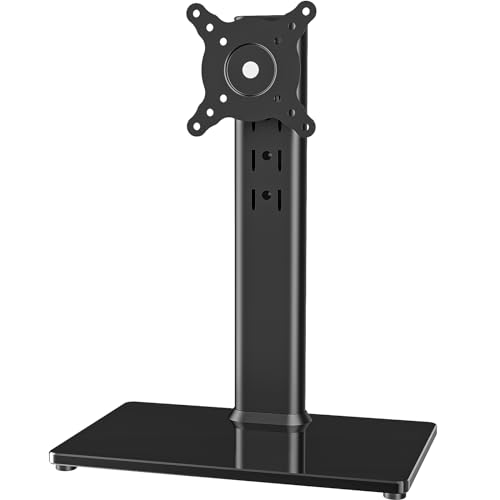
The Hemudu stand is a free-standing mount compatible with screens from 13 to 32 inches. It features versatile mounting patterns (50x50mm, 75x75mm, 100x100mm) and includes cable management. With tilt (-15° to +10°), swivel (-50° to +50°), and 360° rotation, users can adjust orientation for portrait or landscape views. Height is elevated through a center-tube with four levels, enabling a comfortable viewing angle and ergonomic positioning for extended desk work.
WALI Computer Monitor Stand For Desk

The WALI monitor stand offers a large 14.6 x 9.3 inch metal platform with a 44-pound weight capacity. It elevates monitors, notebooks, or printers by up to 5.5 inches, providing improved posture and viewing comfort. The top is designed with ventilation holes to help prevent overheating, while rubber pads keep devices from slipping and protect the desk surface. It integrates a practical, sturdy solution suitable for office, school, or home use.
TAVR Dual Monitor Stand Riser With Storage
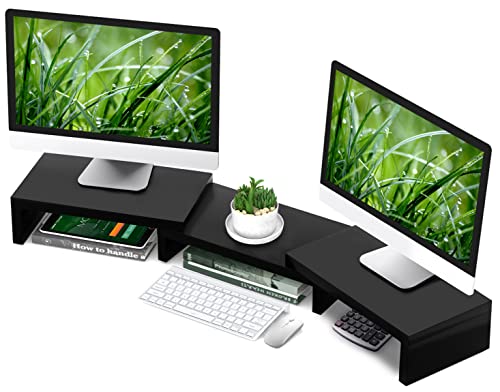
This desk riser supports two or three monitors and features three storage shelves underneath, making it ideal for compact spaces where organization matters. It is designed to bring monitors to eye level for improved posture and includes a straightforward assembly process. The extra-wide footprint accommodates multiple devices, including TV, laptop, gaming consoles, and peripherals, creating a consolidated workstation.
BoYata Monitor Stand

The BoYata monitor stand features adjustable height and a solid metal construction designed to support heavier displays. It includes a twist knob for height settings, helping users tailor the stance to personal comfort. Its ergonomic design aims to position the screen at eye level to reduce shoulder and neck strain, while the sturdy base minimizes wobble during typing or scrolling. The stand is built to last with a focus on stability and durability.
Buying Guide: Key Purchase Considerations
- Monitor size and weight compatibility: Verify that the stand supports your screen dimensions and weight; some models handle multiple monitors, while others are optimized for a single display.
- Adjustability options: Look for height, tilt, swivel, and rotation adjustments to tailor the viewing angle and reduce neck strain. Consider whether you need 360° rotation for portrait or landscape use.
- Desk space and under-stand storage: Riser designs with open space beneath help store keyboards, notebooks, or other accessories, maximizing desk efficiency.
- Stability and build quality: Metal constructions with non-slip feet or pads reduce wobble and protect surfaces. Check weight capacity if you use heavier monitors.
- Cable management: Integrated channels or clips help keep cords organized and out of the way for a clean workspace.
- Ease of assembly: Some stands promise quick setup with numbered parts and included tools; compare assembly time to minimize downtime.
- Versatility vs. specialization: Dual- or triple-monitor stands suit multi-screen workflows, while single-monitor models often prioritize compactness and portability.
- Ergonomics: Prioritize stands that position screens at eye level to reduce neck and shoulder strain over long work sessions.
- Under-desk clearance: If you plan to store keyboards or other devices beneath the stand, ensure enough height and space for comfortable use.
- Compatibility with peripherals: Some stands include tablet or phone holders, drawers, or additional shelves for enhanced organization.
When choosing an adjustable monitor stand, balance your workspace constraints with ergonomic goals. A well-chosen stand can reduce glare and strain, improve posture, and create a tidier desk—benefiting daily productivity and long-term comfort.