Best All in One Wall Mount Solutions for TVs, Monitors and More
Finding a single mounting solution that fits multiple devices—TVs, monitors, gaming consoles, routers and other gear—can simplify setup and save space. This guide highlights top all-in-one wall mount options, focusing on versatility, safety, and ease of use. Each pick supports a range of sizes and weights, offers full motion or tilt, and helps reduce clutter. Read on to compare five strong choices and learn what to look for before you buy.
| Product | Recommended For | Key Strengths | VESA/Weight Range |
|---|---|---|---|
| The All-in Wonder Mount by Mount Genie | Routers, Modems, Small AV Gear | Versatile, supports up to 50–100 lb depending on anchoring | 10″–31″ circumference, up to 31″ span |
| Pipishell Full Motion TV Wall Mount | 13″–43″ TVs and computer monitors | Full motion with tilt, swivel, and 360° rotation | 75×75–200×200 mm |
| Pipishell Tilt TV Wall Mount | 23″–55″ TVs, eye/neck comfort | Low profile, 0–8° tilt, anti-glare design | 100×100–400×400 mm |
| ELIVED TV Wall Mount | 26″–60″ TVs, corner mounting | Full motion with extensive swivel/tilt, single stud design | 100×100–400×400 mm |
| VIVO Full Motion Ultrawide Monitor Wall Mount | Ultra-wide monitors up to 49″ | Low profile, wide reach, robust steel | 75×75–100×100 mm |
Below are five all-in-one mounting options tailored to diverse setups—from home theaters to workspace desks. Each section includes an accessible link to the Amazon listing, a visual, and a concise feature recap to help you compare at a glance.
All-In Wonder Mount By Mount Genie
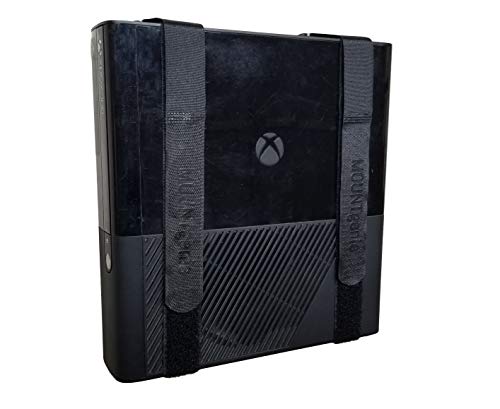
The All In Wonder Mount from Mount Genie emphasizes compatibility with a wide range of components. Its patent-pending “T-Bracket” is made from durable nylon and supports more than 50 pounds when anchored to drywall, or up to 100 pounds when anchored to a stud. It fits components from 10 inches to 31 inches in circumference, including routers, modems, soundbars, Apple TV, DVRs, and more. This one-size-fits-all approach makes it a practical choice for eliminating clutter around media centers and desks.
Pipishell Full Motion TV Wall Mount

This Pipishell wall mount supports most 13″–43″ LED/LCD TVs and monitors up to 44 pounds with VESA patterns from 75×75 to 200×200 mm. It features full motion: tilt ±9° to −11°, swivel up to 90°, and 360° rotation for portrait or landscape use. The arm extends 14.59″ and retracts to 2.7″, making it suitable for living rooms, bedrooms, and home offices where flexible viewing angles are essential. It’s compatible with many major brands and easy to install on wood studs, concrete, or brick.
Pipishell Tilt TV Wall Mount

This Pipishell tilt mount focuses on a slim profile and glare reduction. It supports 23″–55″ TVs up to 99 pounds with a VESA range of 100×100 mm to 400×400 mm. It sits about 1.3″ from the wall, reducing space usage while offering 0–8° tilt and a clean, open-wall design. Its open wall plate makes clean wiring easier, particularly when mounting over outlets, and the edge design helps prevent TV slippage for secure installation.
ELIVED TV Wall Mount

The ELIVED full-motion wall mount is designed for versatility in corner installations and single-stud mounting. It supports most 26″–60″ TVs with VESA patterns from 100×100 to 400×400 mm and weights up to 77 pounds. Its three-arm construction provides strong support while offering a wide range of motion: left/right swivel up to 90°, up/down tilt, and additional level adjustment for precise alignment. It’s well-suited to multi-room setups and spaces where wall corners are common.
VIVO Full Motion Ultrawide Monitor Wall Mount

The VIVO mount is tailored for ultrawide monitors up to 49 inches, with 75×75 and 100×100 mm VESA patterns. It features a low-profile design that folds flat against the wall yet extends up to 10.5″ for flexible viewing. Built from high-grade steel, it supports up to 44 pounds and provides robust tilt and swivel options to tailor screen positioning for gaming, design, or productivity tasks. This is a practical upgrade for multi-monitor workstations needing space-saving support.
Buying Guide: Key Considerations For All-In-One Wall Mounts
Device compatibility: Check your TV, monitor, router or other gear’s size and weight. Confirm VESA patterns and maximum load to avoid overloading the mount.
Motion range: Decide how much movement you need daily. Full motion, tilt, swivel, and rotation features impact comfort and viewing angles, especially in multi-seat rooms or corner spaces.
Installation surface: Ensure you have the right anchoring options (studs, concrete, brick). Some mounts are designed for single stud installations, while others provide multiple wall-surface options or wall-plate accessibility for wiring.
Space and profile: Low-profile mounts save space but may limit reach. If you have a tight room, a mount with a shorter extension and retractable arm can reduce clutter and improve posture.
Durability and materials: Look for steel or high-strength nylon components for durability, particularly for heavier gear or frequent movement. Robot-welded frames and quality finish help long-term reliability.
Cable management: A clean setup benefits from integrated cable routing or open-wall-plate designs to keep cords organized and reduce snag hazards.
Versatility vs. specialization: All-in-one mounts excel at flexibility, but if you predominantly use one device type, a purpose-built mount may offer simpler install and lighter weight.
Warranty and support: Consider manufacturers that offer clear warranty terms, replacement parts, and helpful customer support for mounting quirks or compatibility questions.
By weighing these considerations, you can select an all-in-one wall mount that maximizes space, reduces clutter, and supports comfortable, flexible viewing or working arrangements across multiple devices.