Best Black Projector Screen Paint for High-Contrast Home Theaters
Black projector screen paint is best for viewers who want stronger perceived contrast in a controlled, dim room and have a projector bright enough for a dark surface. Smarter Surfaces is the clearest direct match in this selection; Paint on Screen S1 is a contrast-focused option, while the remaining products are lighter or gray alternatives rather than confirmed black paints. Compare color, coverage, and projector setup before choosing.
| Product | Best suited for | Color information provided |
|---|---|---|
| Smarter Surfaces Black | Black-screen home theaters | Black |
| Paint on Screen S1 | Contrast-focused entertainment rooms | Not specified |
| COATEZ Ultra HD | Large painted projection areas | Not specified |
| Paint on Screen Ambient Light Rejection | UST projectors and brighter rooms | Matte gray |
| Digital Image Screen Paint | Bright, neutral projection surfaces | Ultra white |
Smarter Surfaces Black Projector Screen Paint

This is the most direct match for shoppers specifically seeking black projector screen paint. The manufacturer says the matte black coating absorbs ambient light to support deeper blacks and sharper perceived detail. It is intended for indoor home theaters and gaming setups and lists compatibility with wallboard, metal, plaster, composites, wood, and smooth concrete.
The product description gives a 140-degree viewing angle. Its gain is inconsistent across the supplied listing: the title says 0.1, while the feature text says 0.2. Confirm the current product specifications before buying. Choose this if contrast is the priority and your projector can produce a usable image on a dark surface; avoid it if you need a bright, light-colored image in a well-lit room.
Paint on Screen S1 Ultimate Contrast

Paint on Screen S1 is a contrast-focused alternative for high-end home entertainment spaces. Its listing describes it as a single-coat projector screen paint intended for 1080 HD and 4K UHD clarity and identifies the container as one gallon.
The provided product details do not specify that this paint is black, nor do they include a gain value, coverage figure, or surface compatibility list. Choose it if you are comparing contrast-oriented screen coatings and can verify the color and application requirements with the seller. It is not the safest pick when black color is essential unless the current listing confirms that specification.
COATEZ Ultra HD Premium Projector Screen Paint
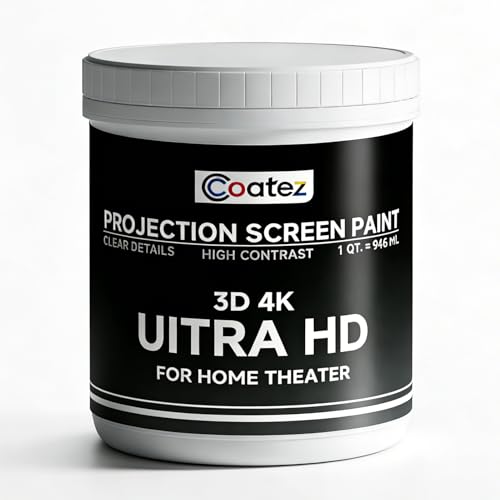
COATEZ is a better fit for buyers who value broad coverage and a single-coat application over a specifically black surface. The listing states that one coat covers 130–140 square feet and gives the paint a gain of 1.6. It is described as washable and repairable, with a low-VOC, non-toxic formula that can be applied with a roller or sprayer.
These features make it a practical option for large indoor projection areas, including media rooms, classrooms, and offices. However, the supplied details do not identify the paint as black. A gain of 1.6 also makes it a different kind of choice from the low-gain black coating above. Choose it when coverage and brightness are priorities, not when you require confirmed black paint.
Paint on Screen Ambient Light Rejection

This matte gray paint is an alternative for shoppers using an ultra-short-throw projector or planning to watch in a room with more ambient light. The manufacturer describes it as an ambient-light-rejection coating for UST setups and lists 1080 HD and 4K UHD clarity, a 160-degree viewing axis, and high polarization retention.
Choose this if your priority is a gray projection surface for a brighter room or UST arrangement. It is not black projector paint, so it does not directly meet a black-screen requirement. The listing’s claims do not provide a coverage figure or enough application detail to compare installation needs with the other products.
Digital Image Ultra White Screen Paint

This ultra-white paint is a useful comparison for buyers who decide a dark screen is not right for their room. The quart is listed to cover 40 square feet with two coats, and the product is described as washable and repairable. Its non-toxic, low-VOC formula is listed for homes, schools, offices, and public spaces.
Choose this if you want a bright white projection surface and can apply two coats to the stated area. It is not black paint, and a white surface will not provide the same dark-screen approach to contrast. Check the wall condition and measured screen dimensions when estimating how much product is needed.
Buying Guide: How To Choose Black Projector Screen Paint
Should you choose black, gray, or white paint?
Start with the room and the image you want. Black paint is intended to absorb more ambient light and emphasize dark tones, but its low gain can make the projected image appear dimmer. A gray surface may suit some brighter-room or UST plans, while white paint is a distinct option when a brighter neutral surface is the goal. Do not treat these colors as interchangeable.
How much coverage do you need?
Measure the intended screen area before buying. Compare the measured area with the product’s stated coverage and number of coats. Among the listed products, COATEZ states 130–140 square feet for one coat, while Digital Image states 40 square feet for two coats. The Smarter Surfaces listing gives 48 square feet in its title. Confirm whether stated coverage reflects the exact application you plan.
What should you verify before applying it?
- Confirm the paint color, gain, and recommended projector setup from the current product listing.
- Check whether your wall material is listed as compatible; Smarter Surfaces names several surfaces, including plaster, wood, and smooth concrete.
- Review application method, coat count, and coverage instead of assuming all screen paints apply the same way.
- Prepare a smooth, even surface so wall texture does not interfere with the projected image.
Frequently Asked Questions
Does black projector screen paint improve contrast?
It is designed to absorb ambient light and support deeper perceived blacks. The result also depends on projector brightness, room lighting, and the surface.
Is black projector paint suitable for every room?
No. A dark surface can make the image dimmer, so it is generally a better fit for controlled lighting and a projector capable of producing adequate brightness.
Is matte gray paint the same as black screen paint?
No. The Paint on Screen ambient-light-rejection product is listed as matte gray. It may suit a different room or projector setup, but it is not a confirmed black coating.
How many coats should I apply?
Follow the specific product’s directions. The listings vary: COATEZ describes one-coat coverage, while Digital Image specifies coverage with two coats.
Can I use ordinary wall paint instead?
The listed products are marketed as projector screen paints with stated projection-related features. The supplied information does not establish that ordinary wall paint will deliver the same results.