Best Cheap Zero-Gravity Workstations for Home Offices and Gaming
Discover budget-friendly zero-gravity workstations designed to balance comfort, productivity, and multitasking. This guide reviews five affordable options that support multiple monitors, ergonomic reclining, and mobile setups, helping you choose a value-packed workstation without breaking the bank.
Summary of Selected Products
| Product | Brand | Monitors Supported | Key Benefit |
|---|---|---|---|
| Ycloroet Zero-Gravity Gaming & Office Chair with Dual Monitor Arm | Ycloroet | Two 27″ monitors | Stable dual-monitor arms with full recline |
| Imperatorworks EASECOMFY T2 Throne Computer Cockpit | Imperatorworks | Up to 5 monitors (configurable) | Racing-seat feel with adjustable options |
| GIMI COCKPIT IW-320 Zero Gravity Computer Gaming Chair | GIMI COCKPIT | Up to five monitors | Motorized backrest and modular brackets |
| GIMI COCKPIT Imperator GM-520 | GIMI COCKPIT | Up to 5 monitors | Executive leather seating with recline |
| IW-R1 PRO Zero Gravity Reclining Workstation | GIMI COCKPIT | 3 monitors (up to 55″ Odyssey Ark with option) | Starlight monitor arm roof concept |
Ycloroet Zero-Gravity Dual Monitor Arm Workstation

The Ycloroet model combines true zero-gravity reclining with a dual-monitor arm system. Its robotic arms securely hold two 27″ monitors, enabling flexible angles for gaming, coding, or transcription tasks. The single-lever recline ranges from an upright 90 degrees to a relaxed 148 degrees, helping reduce back strain during long sessions. Mobility is supported by heavy-duty locking casters that lock in place quickly, ensuring stability on various floor types.
Imperatorworks EASECOMFY T2 Throne Computer Cockpit

This cockpit-style workstation offers a racing-seat aesthetic with multiple configuration options. It supports a broad monitor setup, with claims of compatibility for up to five displays, and includes optional seats with massage functions. Installation is described as straightforward and approachable, with affordable pricing considerations. The system emphasizes adjustability and a compact footprint, making it a potential fit for dedicated gaming zones or compact home offices.
GIMI COCKPIT IW-320 Zero Gravity Computer Chair

The IW-320 variant centers on a motorized backrest and modular monitor brackets capable of supporting five displays. It combines a leather seating surface with a zero-gravity recline, enabling a range of angles from productive upright work to immersive reclining positions. Monitor distance and angle are adjustable, and the setup is marketed for larger multi-monitor configurations, albeit with emphasis on comfort and ergonomic posture during extended use.
IW-R1 PRO Zero Gravity Reclining Workstation

The IW-R1 PRO emphasizes a versatile layout with a starlight ceiling vibe supported by a roof-mounted monitor arm system. It supports multiple monitors, including large formats up to Odyssey Ark configurations via optional brackets. Recline reaches up to 137 degrees, blending an ergonomic seating posture with expansive monitor reach, making it suitable for gaming, video editing, and software development tasks where screen real estate matters.
Imperatorworks CLUVENS Manticore Model

The CLUVENS Manticore offers a programmable workspace with an executive-style seat and a rectangular work area. It supports a range of monitor configurations, including up to five displays in some setups. The design emphasizes ergonomic access to a keyboard and armrests for easy entry and exit, balancing comfort with practical workstation layout for extended use cases.
Imperatorworks R1 Pro White Computer Chair

The R1 Pro White focuses on massage-enabled comfort and integrated speakers, with support for multiple monitors and adjustable monitor distance. This model features RGB lighting and a starry ceiling aesthetic to complement immersive setups. It’s positioned as a mid-to-upper tier option for users who want a more premium feel while still pursuing a budget-conscious zero-gravity workstation setup.
Perfectio X By Zero Gravity
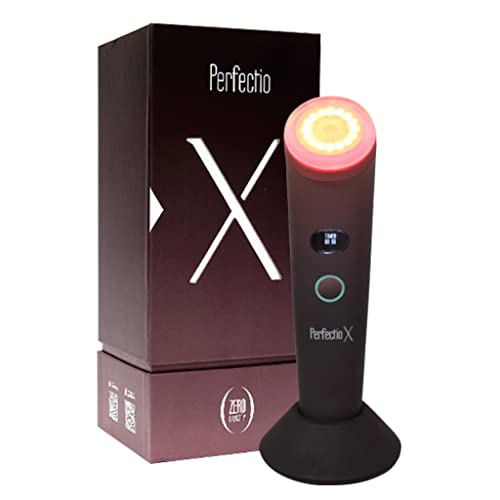
The Perfectio X by Perfectio highlights LED light therapy integration rather than a traditional workstation focus. While not a classic zero-gravity workstation, it is included here as a budget-friendly option for those seeking wellness features that can complement a focused home office or gaming setup without the higher price tag typically associated with dedicated multi-monitor cockpits.
Buying Guide: Key Purchase Considerations
- Monitor capacity and compatibility: Evaluate the maximum number and size of monitors each unit supports. Check whether brackets, arms, or mounts are included or sold separately, and confirm if extra brackets are required for ultra-wide or curved displays.
- Recline range and ergonomics: Look for a zero-gravity recline range that relieves spinal pressure while maintaining proper neck and leg alignment. Consider whether the chair or cockpit allows motorized adjustments and the ease of achieving your preferred posture.
- Mobility and stability: Some models emphasize smooth rolling casters and locking mechanisms for stability on wood, tile, or carpet. Ensure the locking system is robust enough for your floor type and workspace layout.
- Installation and space: Assess the footprint and installation difficulty. Some units come preassembled or with straightforward assembly, while others may require more time and space for proper setup.
- Material quality and durability: Materials range from leather and high-grade foam to synthetic fabrics. Consider durability, ease of cleaning, and how sitting long hours might affect wear and tear.
- Wiring, ventilation, and cable management: A clean design helps prevent overheating and clutter. Check if there are built-in cable channels or recommended cable management strategies.
- Warranty and support: Budget-friendly options can vary in warranty length. Verify what is covered (mechanical parts, monitor arms, cushions) and whether customer support is readily accessible.
- Value versus features: Compare total features—monitor capacity, recline range, seating comfort, portability, and included accessories—to determine which model offers the best long-term value within your budget.
- Use-case alignment: Choose a model aligned with your primary tasks—gaming, software development, design, or streaming. Some configurations favor immersive experiences, while others optimize desk space and multitasking efficiency.
Note: This article presents a comparative, objective overview of available low-cost zero-gravity workstations. Prices, availability, and specific configurations may vary by retailer and region. Always verify current specifications and compatibility before purchase.