Best Dual Monitor Computer Desk Setups for Efficient Workstations
Choosing the right dual monitor desk setup can boost productivity, posture, and comfort. This guide highlights five top dual monitor mounts and risers, focusing on compatibility, adjustability, and stability. Each option supports common 13–32 inch screens and VESA patterns, with either C-Clamp or grommet mounting for secure attachment. Read on to compare features and find the best fit for your workspace.
| Product | Brand | Mount Type | Highlights |
|---|---|---|---|
| HUANUO Dual Monitor Stand | HUANUO | Dual arms with C-Clamp or Grommet | Full motion, 13–32″ screens, 4.4–19.8 lbs per arm |
| VIVO Dual Monitor Desk Mount | VIVO | C-Clamp or Grommet | +90° to -90° tilt, 360° rotation, fits up to 30″ screens |
| gianotter Dual Monitor Stand Riser | gianotter | Riser with drawer (desk organizer) | Two pen holders, drawer, boosts height |
| HUANUO Dual Monitor Stand – White | HUANUO | C-Clamp or Grommet | Wide range of motion, 13–32″ monitors, 4.4–19.8 lbs |
| TAVR Dual Monitor Stand Riser | TAVR Furniture | Under-desk riser with shelf | Two monitors + extra storage, easy assembly |
HUANUO Dual Monitor Stand — Full Motion

The HUANUO dual monitor arms support 13–32 inch screens with VESA 75x75mm or 100x100mm patterns. Each arm holds 4.4 to 19.8 pounds, offering full motion via tilt, swivel, and rotation. The base supports both C-clamp and grommet mounting, designed for desks sized up to typical thickness ranges. The setup aims to reduce desk wobble through a broader mounting platform and secure fixation, helping maintain a stable work surface during typing or gaming.
VIVO Dual Monitor Desk Mount — Heavy Duty

VIVO’s STAND-V002 holds two screens up to 30 inches and 22 pounds each with VESA 75x75mm or 100x100mm patterns. Its articulated arms provide +90° to -90° tilt, 180° swivel, and 360° rotation, plus height adjustability along a central pole. Mounting is available via heavy-duty C-clamp for desks up to 3.25 inches thick or a compatible grommet option. This model emphasizes flexible viewing angles and easy cable management along the arms and center pole.
gianotter Dual Monitor Stand Riser

The gianotter riser combines a dual monitor stand with built-in desk storage: a drawer and magnetic pen holders. It elevates monitors to eye level to reduce neck strain, improves posture, and frees desk space underneath for a keyboard, mouse, or other items. The design emphasizes organization and space efficiency, making it suitable for compact work areas where keeping a tidy surface matters alongside dual-monitor usage.
HUANUO Dual Monitor Stand — White

The HUANUO white model mirrors the standard dual-monitor design with VESA compatibility for 13–32 inch displays and 4.4–19.8 lb per arm. Offering C-clamp or grommet mounting, it emphasizes stability and ease of motion without requiring tools for adjustments. A pneumatic or spring-assisted action (described as smooth) helps users position monitors quickly for an ergonomic setup, supporting various viewing angles and orientations.
TAVR Dual Monitor Stand Riser
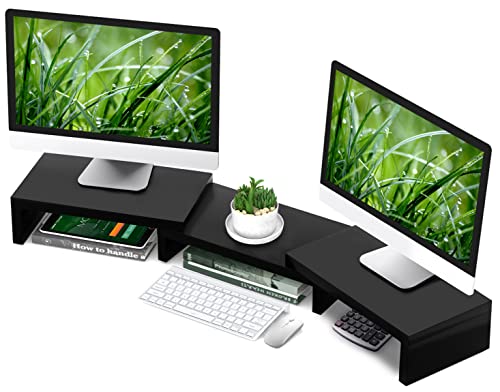
The TAVR stand is a desk riser with two monitor slots plus a three-shelf design, supporting setups that require additional storage. It elevates monitors to a comfortable eye level to relieve neck strain and provides extra space for peripherals or documents underneath. The installation is designed for ease, and the unit is marketed to fit two monitors plus additional items, promoting an organized and efficient workspace in tighter areas.
Buying Guide
- Monitor compatibility: Check screen size (13–32 inches) and weight (typically 4.4–19.8 lbs) per arm, plus VESA 75x75mm or 100x100mm mounting.
- Desk compatibility: Ensure your desk can accommodate the mounting method (C-clamp or grommet) and that there are no obstructions underneath.
- Adjustability: Look for tilt, swivel, and rotation ranges that fit your workflow, along with height adjustment and orientation options (landscape/portrait).
- Stability and build: A broader base or dual-clamp system improves stability, especially for heavier or frequently moved monitors.
- Storage and organization: Some models incorporate drawers, pen holders, or risers to maximize desk organization and space.
- Installation: Consider whether tools are required, ease of assembly, and whether the mounting supports multiple mounting options (C-clamp and grommet).
- Multiple monitors vs. laptop or triple setups: For triple or mixed displays, verify additional feet or trays do not interfere with legroom or desk edges.
- Ergonomics: Favor stands with height-adjustable arms and flexible angles to align monitor tops with eye level, reducing strain.