Best Film Scanners to Convert Photo Slides to Digital
The best way to convert photo slides to digital is to use a film scanner that supports your slide format and saves images as digital files. The KODAK Slide N Scan suits buyers with several film types and a large preview screen; Magnasonic is a flexible option for multiple formats; and DigitPro’s 5-inch scanner also handles printed photos. For 35mm collections, a dedicated feeder scanner may be a better fit.
| Product | Best For | Key Consideration |
|---|---|---|
| KODAK Slide N Scan | Multiple film sizes and large-screen preview | SD card sold separately |
| Magnasonic FS71 | Broad film-format support | HDMI cable and SD card not included |
| DigitPro 5-inch Scanner | Slides, negatives, and printed photos | Confirm your print size is supported |
| DigitConvert 22MP Scanner | Large-screen, one-touch scanning | SD card not included |
| DigitPro 35mm Scanner | Framed 35mm slide collections | Limited to 135 film and slides |
KODAK Slide N Scan
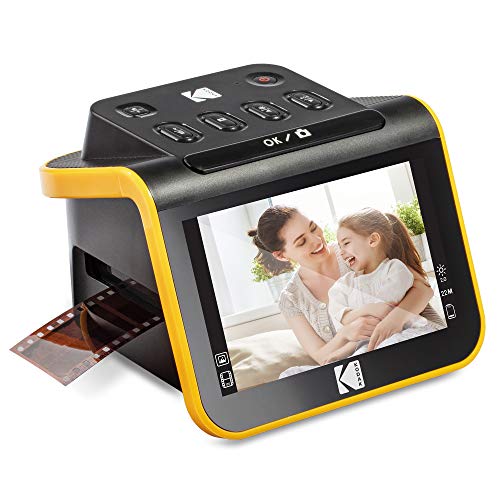
Best for: Families digitizing a mix of common film and slide formats who want a large screen for previewing images. The scanner handles 135, 110, and 126 negatives, as well as 135, 110, and 126 slides. It saves digital files to an SD card and has a 5-inch LCD with gallery mode.
The quick-feed tray is designed for continuous loading, and the listed accessories include slide and film holders, a cleaning brush, and USB and HDMI cables. This broad format coverage makes it a versatile choice for collections gathered over many years.
Limitation: The SD card is not included, so plan to provide one for saving scans.
Magnasonic All-in-One FS71

Best for: Buyers whose archives include several film types, including Super 8. The FS71 converts 35mm, 110, 126, and Super 8 film negatives, plus 135, 126, and 110 slides, into digital JPEG files. Its 5-inch screen lets you view scans on the device, and an HDMI connection can send the display to a television or monitor.
It has 128MB of built-in memory and an SD card slot supporting expandable storage up to 128GB. Choose it if format flexibility and direct viewing are more important than scanning printed photographs.
Limitation: The SD card is not included, and the HDMI cable is also sold separately.
DigitPro Photo, Slide & Negative Scanner

Best for: Households that want one device for film and certain printed photos. This model digitizes 35mm slides, 135 and 110 negatives, printed photos in 3R, 4R, and 5R sizes, and business cards. A 5-inch screen supports previewing and editing, while the standalone design works without a computer, software, or drivers.
Compared with film-only scanners, its printed-photo support makes it a broader option for organizing different kinds of family keepsakes. The listed one-touch controls are intended to keep the scanning process straightforward.
Limitation: Printed-photo support is specified for certain sizes, so check whether your prints match 3R, 4R, or 5R before choosing it.
DigitConvert 22MP Slide Scanner

Best for: Buyers who want a large built-in display and broad stated film support. It converts 135 and 110 negatives and 135, 110, 126, and Super 8 slides to JPEG files. The 5-inch screen has gallery mode, and the scanner’s onboard controls allow users to select film type and adjust color and brightness.
One-touch scanning and direct SD-card saving can suit people who prefer to work without complicated computer software. Its support for several slide formats makes it a practical option for mixed collections.
Limitation: The SD card is not included. The listed supported card capacity is up to 64GB, using FAT32 or exFAT.
DigitPro 35mm Film Scanner

Best for: People digitizing a collection made up of 35mm negatives and slides. This standalone scanner creates JPEGs and offers positive, negative, and black-and-white modes. Its quick-loading feeder is designed for continuous slide processing, and the product listing specifies compatibility with framed slides up to 2mm thick.
The 2.4-inch LCD supports on-device preview and editing. TV-out provides another way to view images on a television without first transferring them to a computer.
Limitation: The listed formats are 135 negatives and slides, so choose a different scanner if your collection includes 110, 126, or Super 8 film.
Buying Guide: How To Choose A Slide Scanner
Which film and slide formats do you need to scan?
Check the format printed on your slide mounts or film packaging before buying. A scanner that supports 35mm may not handle 110, 126, or Super 8. For mixed archives, compare each model’s exact format list rather than relying on a general label such as “all-in-one.”
Do you want a standalone scanner or a phone-based option?
Standalone scanners can preview images on a built-in screen and may save files directly to an SD card. A mobile scanner, by contrast, uses a smartphone and scanning app. That compact approach can be convenient, but it depends on a compatible phone and app-based workflow.
How will you preview and save your scans?
A larger display can make it easier to review images on the scanner. Some models also offer HDMI or TV-out for viewing on a larger screen. Check whether the memory card or cable you need is included; several scanners in this list require a separately purchased SD card.
Are you scanning only slides?
If you also want to digitize printed photographs or business cards, choose a model that explicitly lists those materials and sizes. Film scanners are designed for transparencies and negatives, so do not assume they can scan standard prints.
Frequently Asked Questions
Can a slide scanner save photos as digital files?
Yes. The scanners listed here convert supported slides or film into digital files, generally JPEGs. Check each model’s storage method and required memory card.
Do I need a computer to convert slides?
Not necessarily. Several listed models operate as standalone scanners, letting you preview or edit images on the device. Some save directly to an SD card.
Can one scanner handle different slide sizes?
Some models support multiple formats, but support varies. Check the product’s stated compatibility with 135, 110, 126, or Super 8 slides before buying.
Are SD cards included with these scanners?
The KODAK, Magnasonic, and DigitConvert 22MP listings specify that an SD card is not included. Confirm the included accessories for any model before purchase.
Can I digitize printed photographs with a film scanner?
Only if the scanner specifically supports prints. The DigitPro Photo, Slide & Negative Scanner lists support for 3R, 4R, and 5R printed photos and business cards.