Best Floor Standing VESA Mounts for TVs and Monitors
Choosing a floor-standing VESA mount offers a versatile solution to place TVs and monitors without wall mounting. This guide reviews five top options, highlighting compatibility, adjustability, safety, and space-saving benefits to help you pick the right model for living rooms, bedrooms, and offices.
Summary of Selected Products:
| Product | Brand | Screen Range | Max Weight | Key Benefit |
|---|---|---|---|---|
| AM alphamount TV Floor Stand | Alphamount | 13″ – 43″ | 44 lbs | 8 height levels; 30° tilt |
| Rfiver Swivel Floor TV Stand | Rfiver | 32″ – 60″ | 88 lbs | 70° swivel; space-saving wood base |
| Perlegear Floor TV Stand (PGFS09) | Perlegear | 32″ – 70″ | 88 lbs | 9 height configurations; 70° swivel |
| Hemudu Universal Floor TV Stand | Hemudu | 27″ – 65″ | 88 lbs | 80-degree swivel; tempered glass base |
| YOMT Universal Floor Stand | YOMT | 27″ – 70″ | 88 lbs | Wide compatibility; solid base |
AM Alphamount TV Floor Stand

Brand: Alphamount
Compatibility and Capacity: This floor stand fits most 13-43 inch flat or curved TVs and monitors, supporting VESA patterns from 75×75 up to 200×200 mm. It holds up to 44 lbs, making it suitable for a wide range of mainstream displays from brands like Samsung, Sony, LG, Hisense, and Vizio.
Height and Tilt: Eight adjustable height settings range from 43.66″ to 54.68″, allowing screen placement at eye level for ergonomic viewing. A 30° tilt helps reduce glare, with a ±3° leveling feature after installation for precise alignment.
Rfiver Swivel Floor TV Stand

Brand: Rfiver
Swivel and Height: The stand rotates 35° left or right for a total of 70° viewing range, helping minimize glare from different seating positions. It offers 3 height settings with 50 mm increments, totaling 5.9 inches of adjustability.
Stability and Base Design: A wood base with reinforced supports provides stable footing while occupying less floor space, making it suitable for corners or smaller rooms. The two rear corner supports enhance tipping resistance and safety for wall-mounted style setups.
Perlegear Floor TV Stand (PGFS09)
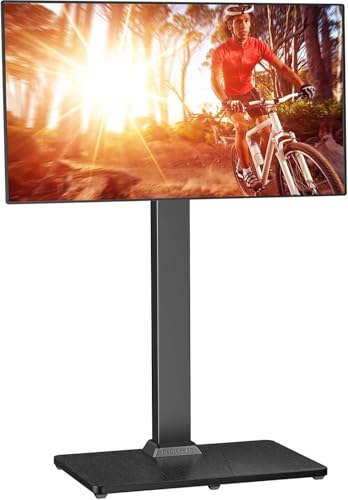
Brand: Perlegear
Comprehensive Range: Designed for 32″ to 70″ displays up to 88 lbs with VESA patterns from 100×100 to 400×400 mm. The stand supports nine height configurations through three hook positions and three panel heights, plus a 35° swivel for ideal viewing from various seats.
Versatility and Installation: It’s a flexible option for living rooms and bedrooms, offering a balance of height variability and turning range to optimize the viewing angle in any space.
Hemudu Universal Floor TV Stand

Brand: Hemudu
Compatibility and Build: Fits most 27″ to 65″ TVs with VESA patterns from 100×100 mm to 400×400 mm, and load capacity up to 88 lbs. An 10 mm tempered glass base paired with a steel pillar provides a sturdy, modern presence that complements various room styles.
Swivel and Height: The stand offers up to 80° of swivel and 4-level height adjustment via a robust design, promoting flexible viewing angles while maintaining a clean, space-saving footprint.
YOMT Universal Floor Stand

Brand: YOMT
Wide Compatibility: Fits 27″ to 70″ TVs and monitors up to 88 lbs with VESA patterns from 100×100 mm to 400×400 mm. The base is constructed for stability, combining a heavy-duty tempered glass base with a steel shaft for a sturdy, unobtrusive look.
Swivel and Height: The stand provides smooth swivel and substantial vertical height adjustment, enabling flexible placement from floor-level setups to near-wall configurations while staying unobtrusive in design.
Buying Guide
- Screen size and weight compatibility: Confirm the maximum TV size and weight the stand supports. Many models cover a broad range (e.g., 27″–70″), but always check your exact display’s VESA pattern and weight.
- VESA compatibility: Ensure your TV or monitor uses a VESA mounting pattern within the stand’s supported range (commonly 75×75 to 400×400 mm).
- Height adjustability: Consider how the stand’s height settings align with your seating height and furniture. More height options help achieve eye-level viewing.
- Swivel angle: If glare or multiple viewing seats are a concern, choose a model with a wide swivel range (e.g., 70° total) to direct the screen as needed.
- Base design and footprint: A stable base reduces tipping risk. Wood and tempered glass bases often balance aesthetics with stability, especially in corner placements.
- Cable management: Integrated channels help keep cords tidy, reducing clutter behind the stand and improving safety.
- Accessibility of outlets: Some stands include built-in power outlets or accessory shelves, which can streamline device connections but may require additional space and cable planning.
- Room placement: For small rooms, consider slim profiles and floor space utilization. For corner setups, models with efficient base design maximize usable space.
- Assembly and durability: Look for sturdy construction with steel pillars and robust mounting brackets. Check warranty terms for long-term reliability.
- Special features: Some stands offer extra features like tilt (+/-), 80° swivel, or 9+ height configurations. Prioritize features that match your typical viewing scenarios.