Best iPad Stand With Printer Shelf for POS and Kiosk Use
Find the right iPad stand with a built-in printer shelf to streamline checkout, reduce clutter, and improve customer service. This guide compares five top options designed for 9.7″ to 13″ iPads and tablets, featuring secure enclosures, easy assembly, and printer integration for retail and hospitality environments. Each pick emphasizes durability, ease of use, and compatibility with small thermal printers.
| Product | Brand | Compatibility | Key Benefit |
|---|---|---|---|
| Zywell TS32 White Stand | ZYWELL | 9.7″–13″ tablets | Metal build with ready-to-use setup |
| Mount-It! iPad Kiosk Stand | Mount-It! | iPad 7–10, Air & Pro | Locking enclosure + built-in printer shelf |
| Zywell TS32 iPad Pos Stand Swivel | ZYWELL | 9.7″–13″ tablets | Swivel with printer shelf, no installation |
| CTA Digital Anti-Theft Kiosk Stand | CTA Digital | iPad 11th Gen, Air, Pro 11″ & more | Locking enclosure with printer shelf |
| Skandiquip Printer Stand for Desk | Skandiquip | Printer and small devices; desk setups | Two-tier design with sturdy steel frame |
Zywell TS32 White Stand With Thermal Printer Shelf

The Zywell TS32 is a solid, all-metal stand designed for 9.7″ to 13″ tablets. It includes a dedicated shelf for a compact thermal printer and features a tilt-capable design for comfortable checkout workflows. It arrives ready to use with no assembly required and includes a scratch-resistant pad to protect the device. Note that the stand is relatively heavy and not intended for frequent relocation.
Mount-It! iPad Kiosk Stand with Printer Shelf

This Mount-It! model provides a secure iPad kiosk enclosure with a locking mechanism. It accommodates iPad generations from 7 to 10, including Pro models, and includes a built-in printer shelf to streamline POS transactions. The enclosure protects against tampering while maintaining a clean, organized checkout area.
ZYWELL TS32 iPad POS Stand Swivel
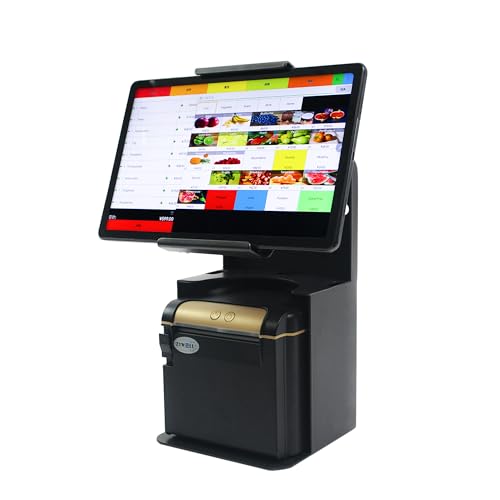
Known for its universal compatibility and swivel capabilities, this stand supports 9.7″ to 13″ tablets and offers a compact printer integration. The design emphasizes space-saving efficiency, an all-metal build, and easy setup with no installation required, making it suitable for busy checkout counters.
Anti-Theft Kiosk Stand – CTA Secure Enclosure

The CTA Digital kiosk is designed for high-traffic retail environments, featuring a locking printer compartment and organized cable routing. It supports a wide range of iPad models, ensuring compatibility with newer devices while maintaining a secure, professional setup for customer-facing transactions.
Skandiquip Printer Stand For Desk

This two-tier desk printer stand from Skandiquip emphasizes heavy-duty stability with a 60 lb capacity. Its modern Z-shaped design provides easy access to the lower shelf while supporting two-tier storage for printers, paper, and accessories. Built to reduce desk clutter and improve workflow, it suits varied office aesthetics.
VYUOL Printer Stand For Desk

The VYUOL desk printer stand combines particleboard with iron pipes for a sturdy workspace solution. Its X-shape support and diamond-mesh bottom improve stability and organization, with a compact footprint ideal for home offices and smaller work areas. It provides elevated placement for printers and storage for supplies at the bottom tier.
Buying Guide: Key Purchase Considerations
- Compatibility: Confirm the supported tablet sizes (9.7″–13″) and whether your model (iPad Air, Pro, or standard models) fits the enclosure or stand design.
- Printer Shelf Size: Check the maximum printer dimensions (width, depth, height) to ensure your receipt printer or mini thermal printer fits securely without overhang.
- Security: Decide if a locking enclosure is essential for your environment, especially in high-traffic retail or hospitality spaces to deter tampering.
- Installation and Mobility: Some models arrive ready to use with no assembly, while others may require mounting or limited assembly. Consider whether you will relocate the stand often.
- Durability and Materials: Metal builds offer durability for busy counters; wooden or mixed-material designs may prioritize aesthetics in offices or boutique stores.
- Space Efficiency: Evaluate desk space and how a stand with a printer shelf optimizes workflow, including tilt and rotation features for cashier visibility.
- Warranty and Support: Look for product warranties and manufacturer support to address fitting issues or printer compatibility over time.
- Security vs. Accessibility: Weigh the need for easy staff access against the risk of theft or tampering, choosing between fully enclosed, semi-enclosed, or open designs accordingly.