Best Monitor Arm Desk Setup for a Cleaner Workspace
The right monitor arms can transform a cluttered desk into a streamlined, ergonomic workstation. This guide highlights five capable options and how they fit into a thoughtful, flexible setup. Each product emphasizes sturdiness, range of motion, and easy installation to help you optimize screen placement for comfort and productivity.
| Product | Key Benefit | Weight Range | Mount Type |
|---|---|---|---|
| VIVO STAND-V002O | Strong counterbalanced arms for smooth, tool-free positioning | 4.4–19.8 lbs per monitor | Gas spring / C-clamp & grommet |
| Acer Dual Monitor Arm | Wide tilt, rotation, and height adjustability | 4.4–19.8 lbs per monitor | Gas spring / C-clamp & grommet |
| MOUNTUP Dual Monitor Stand | Flexible dual-arm design with easy installation | 4.4–17.6 lbs per monitor | C-clamp & grommet |
| HUANUO Triple Monitor Mount | Three-monitor setup with comprehensive motion | Up to 19.8 lbs per monitor | VESA compatible |
| ARES WING Dual Monitor Arm | Heavy-duty support for ultrawide and large monitors | Up to 44 lbs per arm | Gas spring / VESA |
VIVO Dual Monitor Arm – STAND-V002O
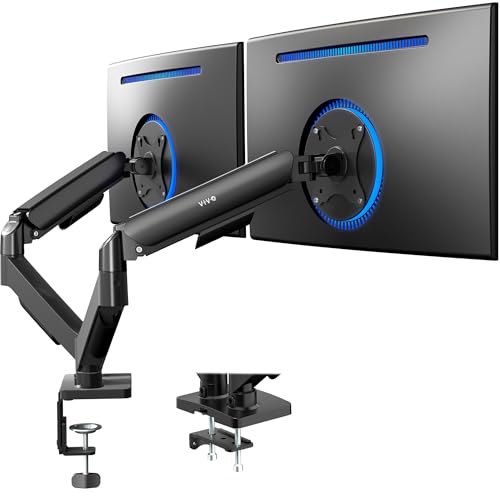
The VIVO STAND-V002O supports two screens from 17 to 32 inches, with a combined weight range of up to 19.8 pounds per monitor. It uses a pneumatic counterbalance system for effortless, tool-free height and angle adjustments. The arms offer +90° to -90° tilt, 180° swivel, and 360° rotation for versatile viewing. Note that the arms may extend beyond the desk edge in some configurations, which can affect desk space planning.
Acer Dual Monitor Arm – 17–32″ Screens

Acer’s dual-arm design lifts two monitors up to 32 inches with a 4.4–19.8 lb per monitor capacity. It features extensive motion with 360° rotation, +90°/-60° tilt, and ±90° swivel. The system includes both C-clamp and grommet mounting bases and provides up to 18.1 inches of height adjustment and 21.25 inches of extension for flexible layouts that reduce desk clutter and improve ergonomics.
MOUNTUP Dual Monitor Stand

This MOUNTUP system fits two monitors from 17 to 32 inches and 4.4–17.6 pounds per monitor. It supports VESA patterns 75×75 mm and 100×100 mm. The arms provide 135° tilt, 180° swivel, and 360° rotation, enabling both portrait and landscape setups. Quick installation is possible with either a C-clamp or grommet base for desks 0.39″ to 4.53″ thick, making it a versatile choice for various desks.
HUANUO Triple Monitor Mount

The HUANUO triple monitor stand supports up to 27 inches per screen with VESA 75×75 or 100×100 mm. It delivers a robust combination of tilt, swivel, and rotation with 12.2 inches of height adjustment. Each arm has its own motion range to tailor viewing angles for meetings, gaming, or design work, helping to minimize neck strain and maximize desk efficiency.
ARES WING Dual Monitor Arm – 17–49 Inch
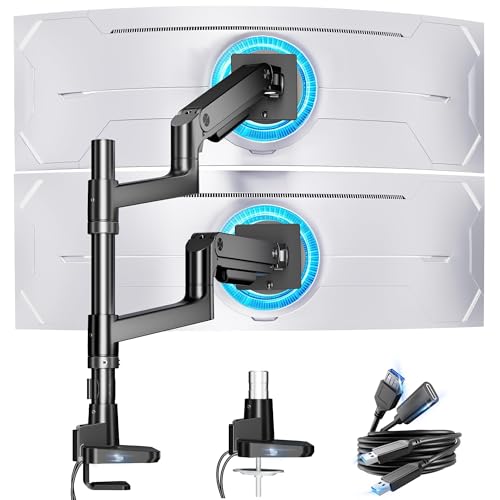
The ARES WING system is designed for ultrawide and large monitors, with each arm supporting up to 44 pounds and a range that accommodates 17–49 inch displays. It offers +50° to -20° tilt, ±90° swivel, and 360° rotation, with a maximum height shift of about 27.9 inches and 22.4 inches of extension. Durable construction and fatigue-tested gas springs ensure stability during frequent adjustments.
ARES WING Dual Monitor Stand (Second Model)

This second ARES WING option focuses on stacked, vertical alignment for two large or ultrawide monitors up to 49 inches. It supports 17–49 inch displays with a maximum load of 44 pounds per arm, offering 360° rotation and a tilt range of -50° to +20°. It is designed to accommodate diverse layouts, including stacked configurations for deeper desk setups.
MOUNTUP Single Monitor Arm

The MOUNTUP single-arm solution fits most monitors up to 32 inches and 4.4–17.6 pounds. It supports VESA patterns 75×75 mm & 100×100 mm and offers full motion: 360° rotation, 180° swivel, and +/- 90° tilt. The arm extends up to 19.27 inches and rises up to 16.3 inches, allowing tailored positioning for desk space optimization. Installation is simplified with clamp or grommet mounting options for a drill-free setup or with minimal tools.
Buying Guide: Key Considerations For A Well‑Balanced Setup
- Monitor compatibility: Verify each arm’s supported weight, screen size, and VESA pattern (75×75 mm or 100×100 mm). Heavier ultrawide displays require stronger arms with reliable gas springs.
- Range of motion: Prioritize arms with tilt, swivel, and rotation to support ergonomic viewing angles. Multi-monitor setups benefit from independent arm movement to reduce strain.
- Mounting options: C-clamp bases save desk space, while grommet mounts provide a secure anchor. For fixed desks, bolt-through options may be preferable.
- Installation and maintenance: Tool-free adjustments, easy assembly, and accessible tension controls help users adapt over time without professional help.
- Desk compatibility: Check desk thickness limits and clearance to ensure arms don’t collide with peripherals or hardware.
- Stability and durability: Gas spring systems with tested lifecycles minimize sag and wobble during frequent repositioning.
- Cable management: Some arms include channels or clips to keep cables organized for a clean look and reduced desk clutter.
- Future-proofing: If you anticipate upgrading to larger or more monitors, choose arms offering higher weight capacity and wider tilt/rotation ranges.
Comparative Perspectives
- Best for dense, dual-monitor workspaces: VIVO and Acer offer solid dual-arm options with dependable adjustability and straightforward mounting.
- Best for space-saving, budget-conscious setups: MOUNTUP Dual Monitor Stand provides a flexible, easy install with strong motion control.
- Best for triple-monitor configurations: HUANUO Triple Monitor Mount delivers expansive reach and nuanced adjustment across three screens.
- Best for ultrawide or large monitors: ARES WING arms excel with heavier loads and wider display spans, including ultrawide formats.