Best Wall-Mount Laptop Stands for Clear, Ergonomic Views and Easy Access
Finding the right wall-mount for a laptop combines space-saving design with ergonomic benefits. This guide reviews five strong options that support 10″–17″ laptops and, in some cases, convert into monitor mounts for larger screens. Each product emphasizes adjustable arms, full-motion ranges, and protective padding to minimize scratches. Use the quick-reference table below to compare core specs at a glance.
| Product | Brand | Key Features |
|---|---|---|
| WALI Laptop Wall Mount (GSWM001LP) | WALI | Full motion gas-spring arm; fits 10″-17″ laptops and 17″-32″ monitors; tilt +70°/-45°, swivel ±90°, 360° rotation |
| 2-in-1 Laptop Wall Mount With Detachable Tray | Putilsen Mount | Adjustable platform; 12″-17″ laptops or 17″-32″ monitors; ±90° rotation; 250 mm height adjust; anti-scratch pads |
| UPGRAVITY Laptop Wall Mount | UPGRAVITY | Gas-spring; 12″-17″ laptops or 13″-32″ monitors; forward extension up to 19.7″; ±45° tilt, 180° swivel, 360° rotation |
| HUANUO Laptop Desk Mount | HUANUO | 2-in-1: laptop tray or monitor arm; 13.8″×11.8″ tray; 15″-32″ monitor support; 16″ pole; 360° rotation; cooling holes |
| Mount-It! Ergonomic Laptop Arm | Mount-It! | Dual mounting (wall or pole); 21.8″ extension; +90°/-45° tilt; 180° swivel; converts to monitor arm |
WALI Laptop Wall Mount GSWM001LP
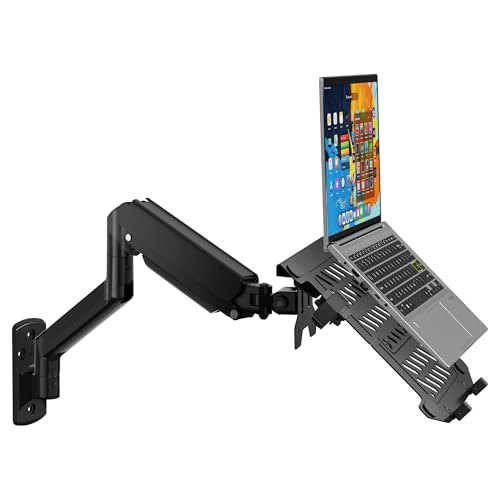
The WALI GSWM001LP offers a full-motion gas-spring arm designed to hold laptops from 10″ to 17″ and monitors from 17″ to 32″. It supports a mounting hole pattern of 75x75mm or 100x100mm for flexible installation. The arm extends from 16.7″ to 19.3″, with tilt, swivel, and rotation options to optimize viewing angles. Space-saving design helps maintain an organized workspace and enhances productivity.
2-in-1 Laptop Wall Mount With Detachable Tray

From Putilsen Mount, this 2-in-1 solution supports 12″–17″ laptops or 17″–32″ displays. The platform width is adjustable for secure fit, with VESA compatibility of 75×75/100x100mm. It offers left-right rotation, a 250 mm height range, and anti-scratch pads to protect devices from scratches during use.
UPGRAVITY Wall Mount With Vented Tray

The UPGRAVITY model combines a space-saving wall mount with a ventilated tray. It fits 12″-17″ laptops and 13″-32″ monitors via VESA 75×75/100×100. A premium gas-spring mechanism allows up to 19.7″ forward extension, with a height up to 16.34″. It supports ±45° tilt, 180° swivel, and 360° rotation for flexible viewing.
HUANUO Laptop Desk Mount

The HUANUO solution is a 2-in-1 system that supports laptops up to 17″ or monitors 15″–32″. It uses a ventilated 13.8″×11.8″ tray, with VESA compatibility (75×75/100×100). Tilt ±45°, swivel, and 360° rotation deliver versatile positioning. A 16″ pole provides robust adjustment for comfortable ergonomic setups and cooling airflow for devices.
Mount-It! Ergonomic Laptop Arm

The Mount-It! arm offers dual mounting options for wall or pole installations. It features a 21.8″ extension, +90°/-45° tilt, and 180° swivel, plus a 360° rotation for full flexibility. It supports laptops 10″–15.6″ and can convert into a monitor arm using the integrated VESA plate, helping to maximize desk space in any setting.
Buying Guide
Purpose and compatibility: Confirm laptop size, weight, and the range of screen sizes the mount can accommodate. If you plan to switch between laptop and monitor, choose a model with an easily removable tray or built-in VESA compatibility.
Adjustability and ergonomics: Look for full-motion features such as tilt, swivel, and rotation to achieve optimal viewing angles. Gas-spring arms typically offer smooth movement and better weight support for larger devices.
Mounting options and installation: Determine if you need wall-only, wall-or-pole, or combined mounting. Check for standard VESA patterns (75x75mm, 100x100mm) and available fasteners. Adhesive options may work for lightweight devices, but screws provide stability for heavier setups.
Cable management and airflow: A good wall mount should conceal cables and provide adequate ventilation to prevent overheating. Ventilated trays improve airflow around laptops during prolonged use.
Durability and protection: Inspect padding or anti-scratch features to prevent damage to your device. Ensure the base and arm materials are sturdy enough to handle your device’s weight over time.
Room integration and aesthetics: Consider how the mount matches your workspace decor and how easily you can access ports and connectors without removing the device.