Best Secure Monitor Desk Mounts for a Safer, Stable Setup
Choosing a secure, stable monitor mount can reduce desk wobble, protect screens, and improve posture. This guide reviews top picks that emphasize solid construction, versatile adjustment, and secure mounting options. Each pick supports a range of monitor sizes and weights, with both C-clamp and grommet installation options for desk stability. Read on to compare features and determine which mount best fits your workspace.
| Product | Brand | VESA Support | Max Weight | |
|---|---|---|---|---|
| HUANUO Dual Monitor Stand | HUANUO | 75x75mm / 100x100mm | 4.4–19.8 lbs per monitor | C-Clamp or Grommet |
| VIVO STAND-V001 | VIVO | 75x75mm / 100x100mm | Up to 22 lbs per monitor | C-Clamp or Grommet |
| HUANUO Heavy Duty Ultrawide Arm | HUANUO | 75x75mm / 100x100mm | Up to 40 lbs | C-Clamp or Grommet |
| HUANUO Single Monitor Arm | HUANUO | 75x75mm / 100x100mm | 4.4–19.8 lbs | C-Clamp or Grommet |
| VIVO STAND-V002 | VIVO | 75x75mm / 100x100mm | Up to 22 lbs per monitor | C-Clamp or Grommet |
HUANUO Dual Monitor Stand

The HUANUO dual monitor mount supports two screens within 13 to 32 inches and 4.4 to 19.8 pounds per monitor. It offers a sturdy HNDS6 design with enhanced stability and supports both C-clamp and grommet base installations. Aims to deliver secure, reliable performance for multi-monitor workstations while minimizing desk movement.
VIVO Single 13–38″ Ultrawide Arm

This single-arm VIVO mount accommodates screens from 13″ to 38″ and up to 22 lbs. It supports VESA 75x75mm or 100x100mm patterns, with +90° to -90° tilt, 360° swivel and rotation, plus up to 16″ of height adjustment. It includes both a heavy-duty C-clamp and an optional grommet base for sturdy desk mounting, ideal for large setups requiring flexible orientation.
MOUNTUP Monitor Mount Reinforcement Plate

This reinforcement plate distributes stress from C-clamp installations, protecting thin or fragile desks. It enhances stability for multi-monitor mounts, including three- or four-monitor configurations, by expanding the base area and reducing desk bending. A practical add-on when upgrading legacy or delicate work surfaces to secure monitor arms.
HUANUO Heavy Duty Ultrawide Arm
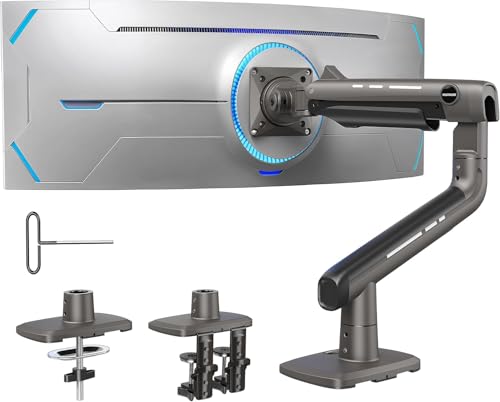
Engineered for ultrawide screens up to 49″ and weights up to 40 lbs, this arm uses a reinforced VESA head and thicker arms for long-term stability. It provides comprehensive motion including tilt, swivel, rotation, and height adjustability up to 19.6″ with a maximum extension of 22.5″. Suits dedicated workstations with large displays requiring solid support.
HUANUO Single Monitor Arm
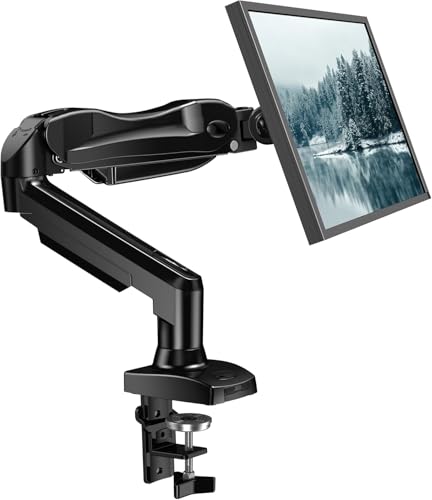
This HUANUO single-monitor arm supports 13–32 inch screens with 4.4–19.8 lbs capacity. It emphasizes ergonomic positioning with tilt (-50° to +85°), rotation (360°), and ample height adjustment. The design prioritizes stability and ease of use, backed by automotive-grade components and extensive motion testing.
VIVO Dual Monitor Desk Mount STAND-V002

Designed for dual displays from 13″ to 30″ and up to 22 lbs per monitor, this VIVO mount features full articulation: +90° to -90° tilt, 180° swivel, 360° rotation, and height adjustment along the center pole. It provides cable management clips and a sturdy C-clamp or optional grommet installation for secure desk mounting.
Buying Guide
Key purchase considerations when selecting a secure monitor desk mount:
- Monitor compatibility: Verify screen size, weight, and VESA pattern (75x75mm or 100x100mm) for each monitor you plan to mount.
- Desk compatibility: Check desk material, thickness, and any under-desk obstructions. Some desks require reinforcement or a grommet base for optimal stability.
- Mount type: C-clamp provides quick install on solid desktops, while grommet mounts offer stronger clamp and cable clearance through the desk.
- Weight capacity and durability: For ultrawide and heavier monitors, choose arms rated for higher weights (e.g., up to 40 lbs) and reinforced construction.
- Range of motion: Consider tilt, swivel, rotation, and height range to achieve ergonomic viewing angles and comfortable desk posture.
- Stability features: Look for reinforced arms, dual-arm configurations, and add-ons like reinforcement plates for delicate surfaces.
- Future flexibility: If you anticipate upgrading to larger or heavier displays, prioritize mounts with higher weight limits and wider VESA support.
- Cable management: Integrated clips or channels help maintain a clean setup and reduce cable strain.
- Assembly considerations: Read installation instructions for proper torque settings and to avoid desk damage or monitor misalignment.
- Multi-monitor setups: Dual- or multi-arm configurations aid in creating space-efficient, secure stations, especially for productivity-intensive tasks.
Across the reviewed options, secure mounting often boils down to choosing the right combination of monitor compatibility, desk compatibility, and robust mounting hardware. For larger or ultrawide displays, prioritize reinforced arms and higher weight capacities. If desk integrity is a concern, consider reinforcement accessories or opting for grommet-based installs. Always ensure VESA compatibility before purchase and verify that your desk can accommodate the selected mounting method without interference.