Best Single Monitor Arm Mounts for Ergonomic Comfort and Space Savings
Finding the right single monitor arm mount can transform your desk setup by improving posture, freeing desk space, and enabling flexible viewing angles. The following selections emphasize load capacity, VESA compatibility, and full-motion adjustability to accommodate a wide range of monitors from 13″ to 49″ and beyond. Each option balances stability with ease of use, making them suitable for home offices, gaming desks, and professional workstations.
style=”display:none;”>Summary Table
| Product | Brand | Max Weight | VESA | Key Advantage |
|---|---|---|---|---|
| HUANUO Single Monitor Mount, 13 to 32 Inch | HUANUO | 19.8 lbs | 75x75mm, 100x100mm | Gas-spring, wide tilt/swivel/rotate |
| WALI Single Monitor Mount, Gas Spring | WALI | 26.4 lbs | 75x75mm, 100x100mm | Gas spring for smooth motion |
| VIVO Single 13 to 38 inch Ultrawide Monitor Arm | VIVO | 22 lbs | 75x75mm, 100x100mm | Wide range, clamp or grommet base |
| WALI Heavy Duty Single Monitor Arm | WALI | 33 lbs | 75x75mm, 100x100mm | Zero-Drift stability, ultra wide support |
| HUANUO Single Monitor Arm, 13–34 Inch | HUANUO | 19.8 lbs | 75x75mm, 100x100mm | Gas spring, strong build |
HUANUO Single Monitor Mount, 13–32 Inch
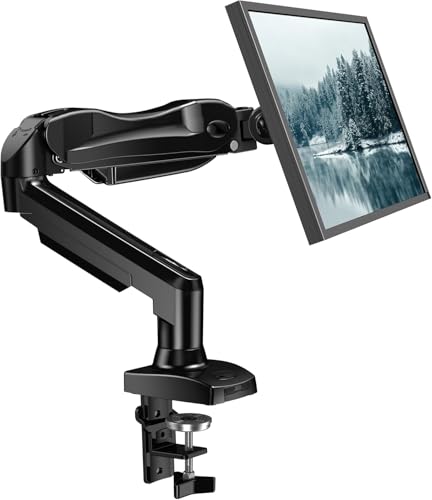
The HUANUO single monitor arm supports 13 to 32 inch displays with a weight range of 4.4 to 19.8 pounds, compatible with VESA patterns 75x75mm and 100x100mm. It emphasizes ergonomic design to reduce strain and offer a comfortable viewing experience. The arm provides full adjustability with a tilt range of -50° to +85°, a ±90° swivel, and 360° rotation. This enables moving the monitor up to 39.6 cm from the desktop with one hand, a feature useful for dual-task workflows and varying desk setups. Built with automotive-grade components, it’s designed for long-term use and stability, surviving extensive motion testing to support five-plus years of service. The base choices include clamp and grommet options to accommodate different desk configurations.
WALI Single Monitor Mount, Gas Spring

The WALI GSMP001N gas-spring arm fits 17″ to 34″ screens with a maximum load of 26.4 pounds for flat panels and 19.8 pounds for curved displays, using standard 75x75mm and 100x100mm mounting plates. It offers full adjustability: +180°/-180° swivel, +70°/-45° tilt, and 360° rotation, enabling comprehensive positioning for multi-monitor setups, streaming, or drawing from different angles. The arm can extend up to about 19.3 inches and raise the monitor up to 17.3 inches above the desk, providing ergonomic flexibility. This model emphasizes sturdy construction and long-term usability for busy workspaces and gaming rigs alike.
VIVO Single 13 to 38 inch Ultrawide Monitor Arm

The VIVO STAND-V001 is designed for 13″ to 38″ displays weighing up to 22 pounds, with VESA compatibility for 75x75mm or 100x100mm patterns. It provides a comprehensive articulation system: +90° to -90° tilt, 360° swivel and rotation, and a height adjustment along a center pole of up to 16 inches. It supports portrait or landscape orientation and comes with both a heavy-duty desk clamp and an optional grommet mount, enabling secure fastening to various desk types. An important consideration is ensuring the backside clearance, as the arm can extend beyond the desk edge in some configurations.
WALI Heavy Duty Single Monitor Arm
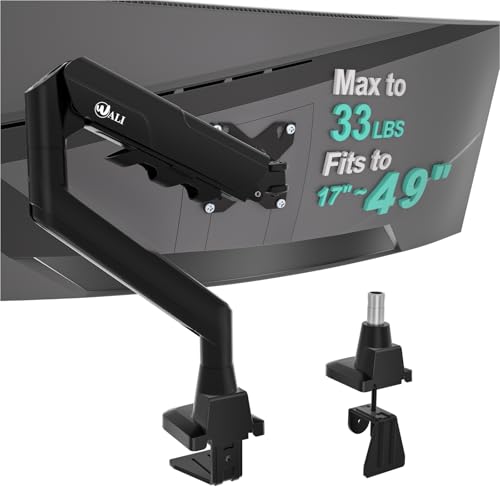
This heavy-duty WALI model supports 17–49 inch flat, curved, and ultrawide monitors with a maximum load of 33 pounds. It features zero-drift stability in its gas-spring mechanism to minimize sag and readjustments during use. The arm frees significant desk space by lifting the monitor up to 20.79 inches and mounting cables through the arm for a cleaner setup. It is designed with gaming and high-intensity work sessions in mind, delivering robust construction and longevity alongside straightforward height and reach adjustments. The package typically includes both clamp and grommet mounting options for flexible desk integration.
HUANUO Single Monitor Arm, 13–34 Inch

The HUANUO 13–34 inch gas-spring monitor arm emphasizes versatility for larger and heavier displays, supporting 4.4–19.8 pounds and VESA patterns of 75x75mm and 100x100mm. It offers +85° to -30° tilt, 180° swivel, and 360° rotation with one-hand height adjustments up to about 22.44 inches from the desktop. The arm uses a robust aluminum alloy build and has undergone 20,000 motion tests to ensure long-lasting reliability. This model is particularly suitable for users who rotate between portrait and landscape modes and require strong stability for tall or wide monitors.
Buying Guide: Key Purchase Considerations
When choosing a single monitor arm, consumers should weigh several factors to match their desk setup and usage patterns:
- Monitor compatibility: Confirm the monitor’s size, weight, and VESA pattern (75x75mm or 100x100mm; some models support wider patterns). Ensure the arm can safely support the weight range and dimensions of your screen.
- Mounting base and desk compatibility: Decide between a clamp-based or grommet-based mount. Clamps work on many desks but require sufficient edge clearance; grommets may offer more stability on thick desks but require drilling.
- Adjustability and motion range: Look for tilt, swivel, and rotate capabilities that fit your workflow. Gas-spring arms offer smooth motion with one-handed adjustments, while mechanical arms may rely on tension or screw-based locking.
- Reach and height: Consider the maximum extension and the height range to avoid obstructing your workspace or screen positioning for ergonomic alignment with your eyes and chair.
- Sturdiness and build quality: A well-built arm reduces sag and wobble over time, especially for heavier or ultrawide monitors. Check material (aluminum is common) and test motion cycles if possible.
- Cable management: Integrated clips or channels help keep cords organized, contributing to a cleaner desk and reducing tangling risk.
- Setup complexity: Tool-free adjustments are convenient, but some models require initial installation steps; consider your tolerance for assembly time.
- Desk space and aesthetics: A slim profile and clean cable routing can improve the overall look of your workspace while maximizing available desk surface.
- Compatibility for future upgrades: If you anticipate upgrading to a larger or heavier monitor, prioritize higher weight capacity and flexible mounting options.
By evaluating these aspects, you can select a monitor arm that aligns with your space, work style, and long-term needs, ensuring ergonomic benefits without sacrificing desk real estate.