Best Sit-Stand Desk Mounts for Flexible Home and Office Workstations
The best sit-stand desk mount depends on whether you want to raise one monitor and your keyboard, or lift a larger work surface with one motion. The PUTORSEN is best for an integrated monitor-and-keyboard setup, while the VIVO STAND-SIT1B suits a single-screen workstation. For dual monitors, consider the VIVO or Mount-It! desk converters; the Mount-It! single-monitor workstation is another option for a compact setup.
| Product | Best For | Configuration |
|---|---|---|
| PUTORSEN Sit Stand Mount | Comfort-focused typing setup | Monitor and keyboard tray |
| VIVO STAND-SIT1B | Single-screen workstation | Monitor and keyboard tray |
| Mount-It! Single Monitor Arm | Existing desk conversion | One monitor and keyboard |
| VIVO DESK-V000K-M2 | Dual monitors with a broad platform | Desk converter and dual mount |
| Mount-It! Dual Monitor Converter | Dual displays in a smaller footprint | Desk converter and dual mount |
PUTORSEN Sit Stand Monitor Desk Mount

This mount combines a monitor arm and keyboard tray in one adjustable workstation. Pneumatic spring technology supports movement between sitting and standing positions. The monitor arm supports up to 9 kg, while the keyboard tray supports up to 1 kg. Both offer tilt, swivel, and rotation adjustments, and the tray includes a padded wrist rest. Built-in cable management helps organize wires.
Best for: People who want their monitor and typing surface to move together, with a wrist rest included. Choose this if you value flexible positioning and an integrated design. Limitation: The listed keyboard-tray capacity is 1 kg, so check the combined weight of your keyboard and other items before choosing it.
VIVO STAND-SIT1B Pneumatic Spring Arm

The VIVO STAND-SIT1B is a desk-mounted option for one screen from 17 to 32 inches, weighing up to 17.6 pounds. Pneumatic spring adjustment moves the monitor and keyboard tray, and both parts provide tilt, swivel, and rotation. The mount also includes cable management for keeping cords organized.
Best for: A single-monitor setup where the screen and keyboard should adjust together. It is a better fit than a freestanding riser when you want an arm-style mount attached to your current desk. Limitation: It is designed for one screen, so choose a dual-monitor solution if you need two displays mounted together.
Mount-It! Single Monitor Sit-Stand Workstation
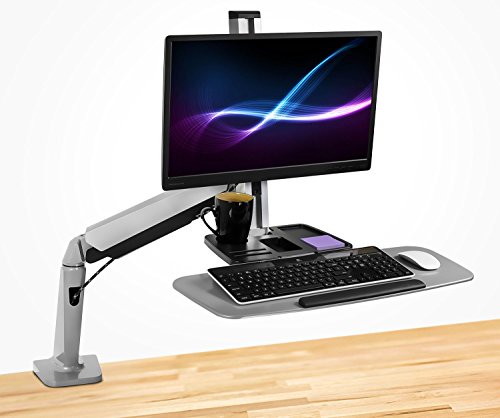
This workstation raises or lowers the monitor and keyboard together to convert an existing desk for seated and standing work. Its gas-spring arm supports monitors up to 32 inches and 19.8 pounds, with VESA 75-by-75 mm and 100-by-100 mm compatibility. The spring tension can be adjusted to match the monitor’s weight.
Best for: Someone who wants a single-screen workstation and an arm with a stated monitor weight limit. It is a practical choice when screen height adjustment is a priority. Limitation: The manufacturer says it is not intended for heavy ultrawide or oversized curved displays.
VIVO 32-Inch Converter With Dual Monitor Mount
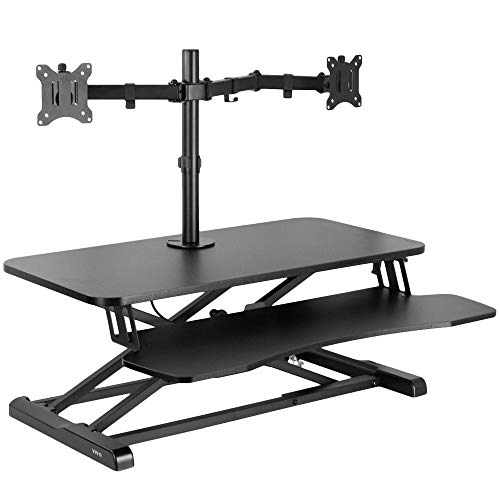
This desk converter combines a 31.5-by-15.7-inch top with a keyboard tray and a dual-monitor mount. It fits two 13-to-30-inch screens weighing up to 17.6 pounds each, with VESA 75-by-75 mm or 100-by-100 mm patterns. The converter adjusts from 4.5 to 20 inches, while the monitor mount offers tilt, swivel, and rotation. A grommet-mounted monitor stand holds the displays.
Best for: Dual-screen users who want the whole workstation to rise and lower together. The broad top and dedicated keyboard tray make it a useful choice for a more complete desktop setup. Limitation: Each monitor must remain within the stated size and weight limits.
Mount-It! Dual Monitor Desk Converter

This converter supports two monitors up to 32 inches and 22 pounds each, using VESA 75-by-75 mm or 100-by-100 mm patterns. Its height range is 5.7 to 17.1 inches, and its platform measures 23.6 by 15.7 inches. The product uses a smooth gas-spring lift and is described as having a compact footprint compared with its workstation functions.
Best for: Dual-monitor users who want a converter with a smaller top platform than the VIVO 32-inch model. Its stated per-screen weight limit is higher, but confirm monitor size and VESA compatibility before buying. Limitation: The 23.6-inch-wide platform offers less surface width than the VIVO converter’s 31.5-inch top.
Buying Guide: How To Choose A Sit-Stand Desk Mount
Do you need a monitor arm or a full desk converter?
A monitor arm with a keyboard tray moves the screen and typing area without adding a broad raised platform. This can suit a compact workstation. A desk converter adds a desktop surface and keyboard tray that rise together, making it a better fit when you want to lift more of your setup as one unit.
How many monitors will you use?
For one monitor, compare the VIVO STAND-SIT1B and Mount-It! single-monitor workstation by screen weight limit, adjustment style, and cable management. For two displays, compare the VIVO and Mount-It! converters. Check each monitor’s size, weight, and VESA pattern; listed screen size alone does not confirm that a monitor will fit.
What should you check before ordering?
- Desk space: Compare platform width and depth with the available area on your current desk.
- Monitor weight: Include the weight of each display and stay within the product’s stated limit.
- Mounting method: Check whether the product uses a desk attachment or, in the VIVO dual-screen converter, a grommet-mounted monitor stand.
- Typing setup: Consider tray dimensions, wrist-rest features, and whether the keyboard moves with the display.
- Movement range: Compare the listed height range with your seated and standing working positions.
Frequently Asked Questions
What is a sit-stand desk mount?
It is an adjustable mount or workstation that helps raise and lower a monitor, keyboard, or desktop setup so a person can work seated or standing.
Can a sit-stand mount hold two monitors?
Some products can. The VIVO and Mount-It! converters listed here support two monitors, subject to their stated screen-size, weight, and VESA limits.
Do all monitor mounts include a keyboard tray?
No. Check the product description for an integrated tray. The five options in this comparison include or provide a workstation surface for typing.
What does VESA compatibility mean?
VESA compatibility refers to the spacing pattern of mounting holes on the back of a monitor. Compare the monitor’s pattern with the mount’s supported patterns before purchase.
Should I choose a converter or an arm-style mount?
Choose a converter if you want a raised platform for your workstation. Choose an arm-style mount if you prefer to attach an adjustable monitor and keyboard setup to your existing desk.