Best Smart Sliding Glass Door Locks for Keyless Home Access
The best smart sliding glass door lock depends on your door’s measurements and the access methods you need. The eLinkSmart built-in Wi-Fi model is best for remote access without a separate hub, while Dhiedas suits buyers who need one-time codes and multiple user accounts. Eseesmart offers broad door-thickness fit, and JNZCH is an option for doors within a narrower stated thickness range. Check the mortise, frame width, and clearance requirements before choosing any model.
| Product | Best For | Notable Feature |
|---|---|---|
| eLinkSmart Built-In Wi-Fi | Remote access without a hub | Built-in Wi-Fi and dual-hook latch |
| Dhiedas 2085 Slim Fit | Temporary guest access | One-time PINs and 300-user capacity |
| Eseesmart Fingerprint Lock | Flexible door fit | Reversible handle and power-bank backup |
| JNZCH Fingerprint Lock | Doors 30–55 mm thick | Automatic relocking |
| eLinkSmart Ultra-Slim Mortise | Multiple entry methods | Fingerprint, keypad, RFID, app, and key |
eLinkSmart Built-In Wi-Fi Sliding Door Lock

This model is best for buyers who want app-based remote access without adding a separate Wi-Fi hub. Its listed five entry methods are fingerprint, password, NFC card, app, and key. The Tuya app can create one-time, temporary, or scheduled access codes.
The lock fits door thicknesses from 22 to 110 mm and includes adapter sets for several thickness ranges. Its dual-hook steel latch and reversible handle are useful features for buyers comparing latch design and door direction.
- Choose this if: You want built-in Wi-Fi, remote app access, and flexible guest codes.
- Check first: The stated minimum frame width is 40 mm; measure your frame and confirm the mortise fit.
Dhiedas 2085 Slim-Fit Smart Lock

This Dhiedas model is best for rental managers or households that need to issue temporary access. It supports fingerprint, passcode, app, RFID, and backup-key entry, and the listing specifies up to 300 users, including nine administrators. It can generate one-time PIN codes and supports remote unlocking through the app without Wi-Fi or a gateway, according to the product details.
Its 2085 slim-fit requirements include door thickness from 22 to 120 mm, frame width greater than 38 mm, and specified clearances of 4 mm from the frame to the lock edge and 20 mm to the cylinder center.
- Choose this if: You need temporary codes or access for many users.
- Check first: The stated clearances are specific; confirm all three measurements before ordering.
Eseesmart Fingerprint Sliding Door Lock

Choose this Eseesmart lock if door fit and handle orientation are major concerns. It supports fingerprint, passcode, mobile app, RFID card, and backup-key access. The product listing gives a door-thickness range of 22 to 120 mm and describes a reversible handle for left- or right-opening doors.
The manufacturer also lists capacity for up to 300 users, an approximately eight-month battery life, low-power warnings, and power-bank backup. These details make it a practical option for households that want several entry methods and an emergency power option.
- Best for: Buyers who need a reversible handle and a wide stated thickness range.
- Limitation: The listing does not provide frame-clearance measurements, so verify mortise and frame compatibility before buying.
JNZCH Fingerprint Smart Sliding Lock
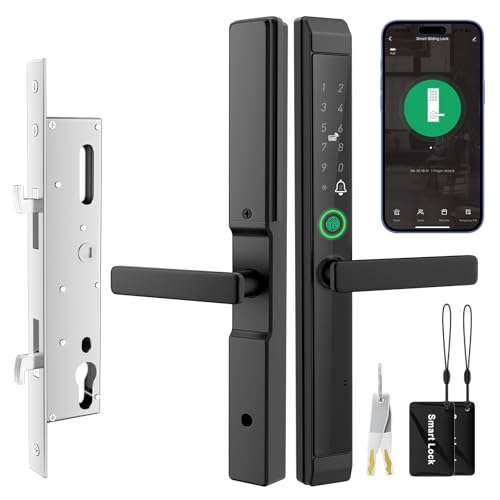
JNZCH is best for buyers whose doors measure 30 to 55 mm thick and who want several unlocking choices. The listed methods are fingerprint, IC card, PIN code, mobile app, and mechanical key. The lock is described as automatically relocking after use, which may suit households that prefer the door to secure itself after entry.
The product requires a 2.4 GHz Wi-Fi network for setup in the Tuya app. Its square spindle is supplied at an initial length of 3-5/32 inches and can be trimmed, according to the listing.
- Choose this if: Your door fits the stated thickness range and you want automatic relocking.
- Avoid this if: Your Wi-Fi setup cannot use a 2.4 GHz network, or your door falls outside the listed dimensions.
eLinkSmart Ultra-Slim Mortise Smart Lock

This eLinkSmart model is best for buyers who want multiple ways to unlock, including fingerprint, password, app, RFID card, and backup key. Its listed features include temporary passwords for visitors, app entry tracking, fingerprint recognition, and an alarm after five incorrect attempts. The lock is described as using AES-256 encryption.
The listing states an approximately eight-month battery life using four AAA batteries, which are not included. It also describes low-battery app alerts and Type-C emergency charging.
- Choose this if: You value varied entry methods, app tracking, and backup charging.
- Limitation: Batteries are not included; check the door’s mortise and dimensions for fit.
Buying Guide: How To Choose A Smart Sliding Door Lock
Will the lock fit your sliding door?
Measure door thickness, frame width, lock-edge clearance, cylinder-center distance, and the existing mortise. Smart sliding locks are not universal replacements. Compare every measurement with the product’s listed requirements, and confirm that the latch type matches your door. A reversible handle can help with opening direction, but it does not guarantee that the lock will fit the existing hardware.
Which access methods do you need?
Fingerprint and keypad entry reduce reliance on a physical key. RFID cards can be convenient for household members, while app access and temporary codes can help with guests or service providers. If you want remote control, distinguish between app features that work locally and models that specifically list built-in Wi-Fi or remote access. Check whether setup requires a particular Wi-Fi band or an additional hub.
How should you compare power and backup options?
Compare stated battery life, low-battery warnings, and emergency power methods. Some listings describe power-bank or Type-C backup, while others specify battery alerts. Check which batteries are required and whether they are included. A backup key can provide another entry method, but it does not replace checking the lock’s power instructions.
What matters for shared access?
For a rental or busy household, check the maximum user capacity and whether the app supports temporary, one-time, or scheduled codes. Review how the listing describes remote unlocking and access tracking. Do not assume that every app-connected lock offers the same remote features.
Frequently Asked Questions
Can a smart lock fit any sliding glass door?
No. Fit depends on door thickness, frame width, mortise pattern, latch design, and clearance. Measure the door and compare those dimensions with the exact product requirements.
Do smart sliding door locks need Wi-Fi?
Not always. Some features use fingerprints, codes, or cards without remote app access. Wi-Fi may be required for setup or remote control on particular models; check the product’s stated requirements.
Can I give a guest temporary access?
Some models list temporary or one-time codes. Confirm whether the specific lock supports the code type and app features you need.
What happens if the batteries run low?
Backup options vary by model. Listings may specify low-battery alerts, emergency charging, a power bank, or a mechanical key. Check the instructions for the lock you select.
Is fingerprint entry the only way to unlock these locks?
No. The featured models list additional methods such as passcodes, RFID cards, app control, or backup keys. The exact combination differs by product.