Best Standing Desk With Monitor Arms for Ergonomic Setups
Choosing a standing desk converter with a reliable monitor mount can transform your daily workflow. This guide highlights five strong options that balance height adjustability, dual-monitor support, and space efficiency. Each pick supports common monitor sizes and offers flexible arms for portrait or landscape viewing, helping you tailor your setup to your work style and space.
| Product | Brand |
|---|---|
| VIVO Height Adjustable 32 Inch Desk Riser with Dual Monitor Stand | VIVO |
| FITUEYES Height Adjustable Standing Desk 32” Wide Sit to Stand | FITUEYES |
| VIVO 32 Inch Desk Converter, K Series | VIVO |
| Mount-It! Electric Standing Desk Converter Dual Monitor Arms | Mount-It! |
| Mount-It! Electric Standing Desk Converter Dual Monitor Arm, X-Large | Mount-It! |
VIVO Height Adjustable Desk Riser With Dual Monitors
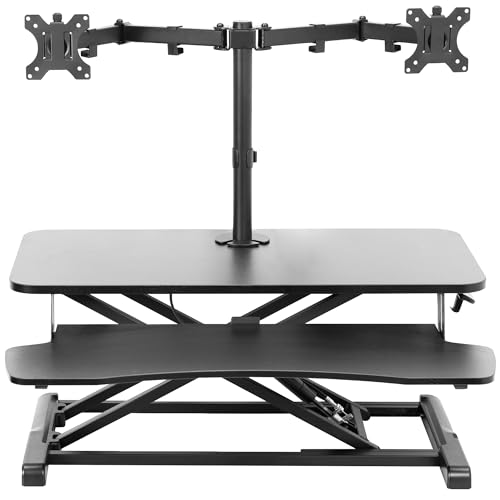
The VIVO DESK-V000K-M2 combines a 32″ desk riser with a built-in dual monitor mount. It supports two monitors from 13″ to 30″ with individual weights up to 17.6 lbs, using VESA 75x75mm or 100x100mm patterns. The height range spans 4.5″ to 20″, letting you switch easily from sitting to standing. The top surface measures 31.5″ x 15.7″, while the keyboard tray is 31.3″ x 11.8″ (10.5″ center). The mount also offers tilt, swivel, and rotation, with a secure grommet attachment for landscape or portrait displays.
This unit emphasizes stability and ergonomics, allowing smooth transitions and flexible monitor positioning. It’s a practical pick for desks with limited depth, offering a compact footprint while maintaining ample room for keyboards and mice. If you frequently switch between tasks and need two screens at adjustable heights, this model provides reliable performance.
FITUEYES 32” Standing Desk Converter With Dual Monitors
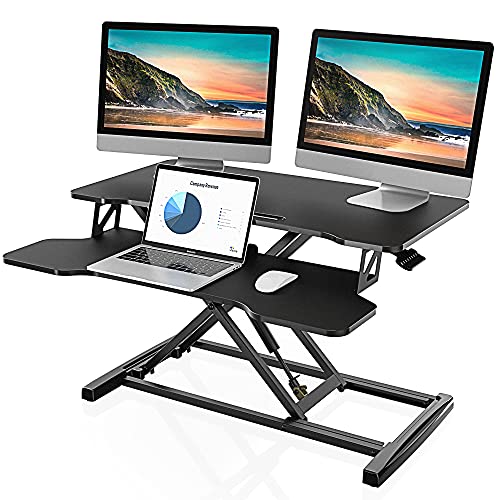
The FITUEYES FSD308001WB converts a 32″ wide workspace into a sit-stand setup. The top surface measures 31.5″ x 15.7″ and can accommodate dual monitors or a monitor plus laptop, with a keyboard tray that slides in sync for ergonomic alignment. Height range reaches up to 19.8″ and lowers to 4.3″, offering substantial adjustability for various heights. A dual gas spring mechanism supports smooth transitions and a simple height locking system ensures stable positioning.
This option focuses on a broad work surface and easy, quiet height changes. It’s well suited for users who want a straightforward, dual-monitor solution without complicated assembly. The large surface can host additional peripherals, making it a versatile choice for multi-device workflows.
VIVO 32 Inch Desk Converter, Dual Monitor And Laptop Workstation

The VIVO DESK-V000K provides instant active standing with a compact footprint. It features a 31.5″ x 15.7″ top surface with a 31.3″ x 11.8″ keyboard tray that moves in tandem with the surface. The lift range is 4.5″ to 20″, enabling quick shifts from sitting to standing to reduce muscle tension and sedentary strain. The dual-monitor mount supports up to two screens, and the design accommodates portrait or landscape orientations, offering flexible viewing angles for improved ergonomics.
This model emphasizes a balance between space efficiency and dual-monitor capability. Its mechanical lift system is designed for steady, controlled height changes, ideal for users who want a reliable, mid-sized setup for day-long computer work.
Mount-It! Electric Standing Desk Converter With Dual Monitor Arms
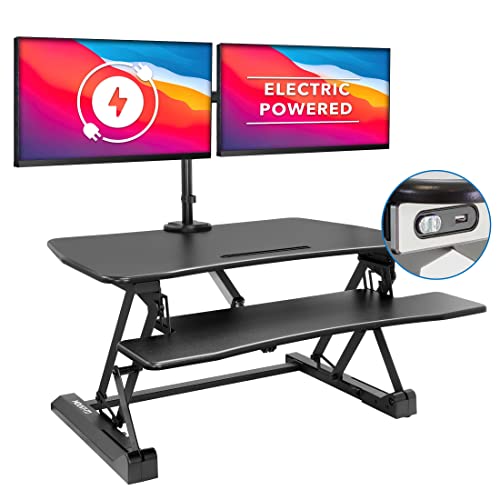
Mount-It!’s electric converter offers motorized height adjustment from 6.3″ to 19.3″ with a large 35.4″ x 23″ desktop. A built-in dual monitor arm supports two screens up to 32″ each, with full tilt, swivel, and rotation for precise alignment. A side device channel helps keep tablets or phones accessible, while USB charging adds convenience. This model emphasizes a roomy work surface and ergonomic reach, making it suitable for complex setups that include documents, input devices, and a tablet or phone dock.
The integration of motorized height control and robust monitor arms makes this an adaptable option for users who demand frequent transitions and a broad range of monitor positions. It’s particularly helpful for multi-monitor workflows that require rapid, precise height adjustments and flexible screen arrangement.
Mount-It! Large Electric Desk Riser With Dual Monitor Arms

This Mount-It! X-Large desk riser features a 47.2″ x 23.2″ desktop, plenty of space for two 32″ monitors and a keyboard tray. It combines a broad work surface with a dual monitor arm system that supports two screens up to 32″ each. Height is adjustable via a one-touch mechanism from 6.3″ to 19.3″. The arms are fully adjustable with VESA compatibility (75×75, 100×100), enabling extensive tilt, swivel, and rotation. A built-in USB charger helps keep devices powered during long work sessions.
With its generous footprint and powerful adjustment range, this model is suitable for users who regularly work with multiple large displays and need precise, ergonomic alignment across both monitors and the keyboard area. It emphasizes workspace organization and ease of use in busy environments.
Buying Guide: Key Purchase Considerations
- Monitor compatibility: Check VESA patterns (75x75mm or 100x100mm) and weight limits per monitor. Ensure the arms support your screen sizes (commonly 13″–32″).
- Height range and locking: Look for a wide adjustment range (roughly 4″–20″) and a stable locking mechanism to maintain desired height during use.
- Keyboard tray and surface space: Ensure the top surface is large enough for dual monitors and the keyboard tray fits your preferred layout without crowding.
- Movement quality: Decide between gas-spring or motorized (electric) lifts. Gas-spring offers smooth transitions; motorized yields easier one-touch height changes at the push of a button.
- Space and ergonomics: Consider desk footprint, chair clearance, and whether you need a large desk surface or a compact footprint for small rooms.
- Cable management: Prefer models with built-in channels or routes to keep cables organized and reduce clutter.
- Durability and warranty: Evaluate frame material, weight capacity, and manufacturer warranty, especially for heavier monitors or long-term daily use.
Comparative Considerations
- Best for space efficiency: Models with 31.5″ x 15.7″ platforms maximize desk area without overwhelming smaller spaces.
- Best for heavy dual-monitor setups: Larger desktops (47.2″ x 23.2″) with robust arms support bigger screens and multiple devices.
- Best value: Mid-range models offering solid dual-monitor support, decent height range, and user-friendly adjustment mechanisms.
- Best for easy one-touch adjustments: Electric lift systems provide quick height changes at the press of a button, ideal for frequent transitions.
- Best for professional desks: Larger trays and integrated USB charging can streamline workflows in office or home-office environments.