Best Desks With Keyboard Tray for Efficient Workspaces
Discover desks that integrate keyboard trays to streamline your setup and boost productivity. The following selections offer built-in keyboard trays, ample storage, and ergonomic design suitable for home offices, study corners, or gaming rigs. Each option is designed to maximize desk space while keeping your keyboard within easy reach.
| Product | Brand | Highlights |
|---|---|---|
| OffiGo U Shaped Electric Standing Desk with Keyboard Tray | OffiGo | U-shaped layout, 3 height presets, monitor stand |
| CubiCubi Computer Desk with Keyboard Tray (47″) | CubiCubi | Upper monitor shelf, under-desk storage, sturdy frame |
| OffiGo U Shaped Electric Standing Desk with Drawers | OffiGo | Drawers, keyboard tray, dual corner design |
| VERMESS 48Inch Computer Desk with Keyboard Tray | VERMESS | Keyboard tray, CPU stand shelf, two monitor capacity |
| FEZIBO 55” Electric Standing Desk with Drawers and Keyboard Tray | FEZIBO | 4 drawers, keypad presets, wide monitor stand |
The following selections highlight desks with integrated keyboard trays and varied storage solutions, helping you choose based on space, storage needs, and ergonomic features. Each product section includes a quick overview, a visual reference, and key features to compare at a glance.
OffiGo U Shaped Electric Standing Desk with Keyboard Tray

The OffiGo U shaped desk provides extra workspace with a dual corner design. It features electric height adjustment from 28.3″ to 46.5″ via three presets, plus a full-size monitor stand that accommodates two displays. Integrated power outlets and USB ports support on-desk charging, and the broad desktop enhances room for peripherals, documents, or gaming gear.
CubiCubi Computer Desk with Keyboard Tray (47″)

Designed for compact spaces, this CubiCubi desk features an upper monitor shelf to elevate displays to a healthy viewing height. Under-desk open shelves increase storage for accessories, while a practical keyboard tray frees desk space. A robust metal frame and MDF board with an X-shaped crossbar deliver dependable stability for daily use.
OffiGo U Shaped Electric Standing Desk with Drawers

This OffiGo model adds two desktop drawers along with a keyboard tray and a full-sized monitor stand. The 2-corner arrangement provides extensive surface area, while the ergonomic monitor stand helps position displays for comfortable viewing. The combination supports organized workstations with improved storage without sacrificing accessibility.
VERMESS 48Inch Computer Desk With Keyboard Tray
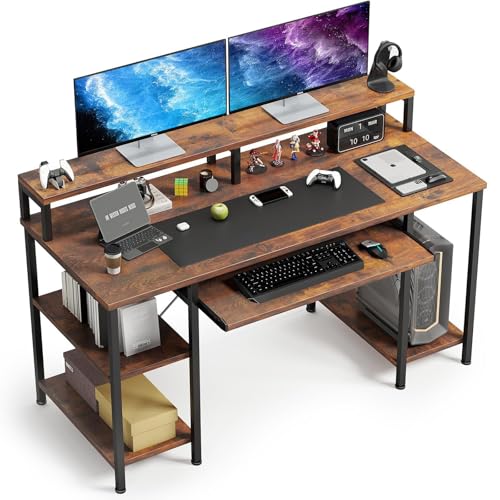
This 48-inch desk combines a built-in keyboard tray with two monitor shelves and a CPU stand, offering a balanced blend of storage and display space. Its modern rustic brown finish makes it adaptable to various home office decors, while the tray ensures easy access to keyboards and mice.
FEZIBO 55” Electric Standing Desk With Drawers and Keyboard Tray

The FEZIBO desk combines a spacious 55-inch surface with four drawers and a keyboard tray. It features a keypad controller for height presets (27″–46″), a top monitor stand, and a sleek light walnut finish. The design aims to reduce clutter while enabling smooth height transitions during work sessions, study, or gaming.
Buying Guide
Key purchase considerations when choosing a desk with a keyboard tray include:
- Workspace needs: Assess desk width, depth, and the tray size to fit your keyboard, mouse, and any additional devices without crowding.
- Storage requirements: Decide between drawers, shelves, and CPU stands to minimize desk clutter and optimize workflow.
- Ergonomics and adjustability: Look for adjustable height ranges, memory presets, and monitor stands that support comfortable eye level and posture.
- Cable management: Desks with built-in outlets or channeling features help maintain a neat, safe setup.
- Build quality and stability: A sturdy frame, reinforced joints, and a stable keyboard tray prevent wobble during use.
- Aesthetics and finish: Choose a color and style that complements your decor while ensuring the tray is easily accessible.
- Assembly complexity: Consider desks with clearly labeled parts and guided instructions to reduce setup time.
When comparing models, prioritize a balance between available workspace, integrated storage, and ergonomic alignment to support long hours of productive use. If possible, verify compatibility with your existing monitors and peripherals to ensure a smooth integration into your workspace.