Best Long-Arm TV Wall Mounts for Flexible Viewing
The best long-arm TV wall mount depends on how far the screen needs to reach, your TV’s weight and VESA pattern, and the wall structure. The HCMOUNTING mount offers the longest listed extension at 43 inches, while the BONTEC 40.9-inch model supports TVs up to 132 pounds. For larger screens, the Perlegear PGXLF02 fits many TVs up to 97 inches; the Perlegear 37.4-inch mount suits buyers prioritizing a 110-pound capacity, and ELIVED is a compact-TV option.
| Mount | Best For | Maximum Extension | Listed TV Capacity |
|---|---|---|---|
| HCMOUNTING | Maximum reach | 43 inches | 42–80-inch TVs |
| BONTEC 40.9-inch | Higher listed weight capacity | 40.9 inches | Up to 132 pounds |
| Perlegear PGXLF02 | Large TVs | 40.1 inches | Up to 150 pounds |
| Perlegear 37.4-inch | Mid-size TVs with a long reach | 37.4 inches | Up to 110 pounds |
| ELIVED | Smaller TVs and single-stud positioning | 37.4 inches | Up to 77 pounds |
HCMOUNTING 43-Inch Long Arm TV Mount

Best for: Buyers who need the greatest stated extension among these picks. Its arm reaches 43 inches from the wall and retracts to 2.75 inches, making it a practical option for corner placement or viewing from different parts of a room.
The mount fits 42–80-inch flat or curved TVs with VESA patterns from 200 × 200 mm to 600 × 400 mm. It swivels up to 90 degrees, tilts 10 degrees up or down, and provides ±3-degree leveling after installation. Choose this model if reach and viewing-angle adjustment are priorities.
Limitation: The listed features do not state a maximum supported TV weight, so confirm the product specifications and your TV’s weight before choosing it.
BONTEC 40.9-Inch Corner TV Mount

Best for: Buyers whose TV is heavier than the stated capacity of many mid-size mounts. This BONTEC model supports up to 132 pounds and fits 32–75-inch TVs with VESA patterns from 200 × 100 mm to 600 × 400 mm.
The arm extends from 2.6 to 40.9 inches. It offers up to 180-degree swivel, ±8-degree tilt, and ±3-degree leveling. Those specifications make it a strong choice for a corner setup that needs substantial reach and post-installation alignment.
Limitation: Installation is specified for wood studs, concrete, or brick—not drywall alone. Check the TV’s VESA pattern and weight, and verify that the wall type matches the installation requirements.
Perlegear PGXLF02 For Large TVs

Best for: Large-screen owners seeking a long-reach mount with a high stated weight limit. The PGXLF02 fits many 42–97-inch TVs, supports up to 150 pounds, and accepts VESA patterns from 200 × 100 mm to 800 × 400 mm.
Its arm extends 40.1 inches and retracts to 3.7 inches. The listed installation options include 8-, 12-, 16-, and 24-inch wood studs, as well as concrete or brick. Choose this model if your TV falls within its unusually broad stated size and VESA ranges.
Limitation: It must not be installed on drywall alone. The extended position also needs adequate clearance from surrounding furniture and walls.
Perlegear 37.4-Inch Mount For 32–65-Inch TVs

Best for: Buyers with a mid-size TV who want a long extension and a 110-pound stated capacity. It fits most 32–65-inch TVs with 100 × 100 mm to 400 × 400 mm VESA patterns.
The arm reaches 37.4 inches and retracts to 2.6 inches. It swivels ±90 degrees, tilts from +5 to −15 degrees, and allows ±3-degree leveling. The product details specify single wood-stud or solid concrete installation, which helps buyers compare it against mounts with different wall requirements.
Limitation: It is not designed for drywall-only installation. Confirm the TV’s weight, screen size, and VESA pattern before purchase.
ELIVED Long-Arm Mount For Smaller TVs
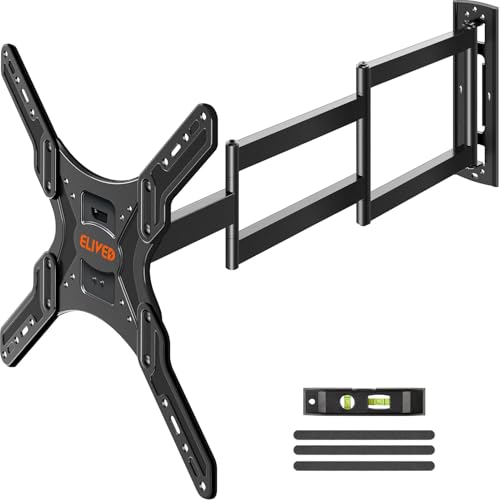
Best for: Buyers with a 26–65-inch TV weighing no more than 77 pounds who want long reach and single-stud positioning. It supports VESA patterns from 100 × 100 mm to 400 × 400 mm.
The arm extends 37.4 inches and retracts to 3 inches. It swivels up to 90 degrees left or right, tilts up 5 degrees and down 15 degrees, and offers ±3-degree leveling. These adjustments help direct the screen toward different seating areas.
Limitation: Its 77-pound capacity is lower than the listed limits of the other selected models. Check the TV’s weight rather than choosing by screen size alone.
Buying Guide: How To Choose A Long-Arm TV Mount
How much extension do you need?
Measure the distance from the wall to the position where you want to watch. A 37-inch arm may be enough for many corner and side-viewing layouts; the 40- and 43-inch options offer more reach. Also check the retracted distance if keeping the TV close to the wall matters.
Will the mount fit your TV?
Check four measurements before buying: screen-size range, TV weight, VESA mounting pattern, and available space around the TV. The VESA pattern is the distance between the mounting holes on the back of the television. A mount’s screen-size range does not guarantee compatibility if its weight or VESA limits do not match.
What wall can you install it on?
These products specify installation on wood studs, concrete, or brick in different combinations. Several explicitly say not to install on drywall alone. Follow the mount’s installation instructions and verify the wall structure and hardware requirements before installation.
Which adjustment features matter?
Swivel helps aim the screen toward different seats, while tilt can change the vertical viewing angle and help address glare. Level adjustment can correct small alignment issues after installation. Compare the listed ranges against your room layout rather than assuming every mount moves the same way.
Frequently Asked Questions
What is a long-arm TV wall mount used for?
It moves a TV farther from the wall than a standard fixed mount, which can help with corner placement or viewing from more than one seating area.
Can a long-arm TV mount go directly on drywall?
Do not assume so. The selected products specify wood studs, concrete, or brick, and some explicitly prohibit drywall-only installation. Check the exact mount’s instructions.
Should I choose a mount by TV size or weight?
Check both. The TV must fall within the mount’s screen-size range and stay within its supported weight limit, with a compatible VESA pattern.
Do all long-arm mounts swivel 180 degrees?
No. Swivel range varies by model and setup. Compare the product’s stated swivel range and consider how the TV will sit when the arm is extended.