Best TV Mounts Hanging From the Ceiling for Different Screen Sizes
A ceiling TV mount is a practical choice when a wall is unavailable or floor space matters. The PERLESMITH is best for common 26- to 65-inch TVs with broad tilt and swivel adjustment; WALI suits buyers who want a flip-down design; USX STAR offers adjustment for angled ceilings; Mount-It! fits TVs up to 75 inches; and VIVO supports larger screens up to 86 inches. Check your TV’s weight, VESA pattern, and ceiling structure before choosing.
| Mount | Best For | Screen Range | Listed Weight Capacity |
|---|---|---|---|
| PERLESMITH PSCM2 | Everyday viewing-angle adjustment | 26–65 inches | 110 lb |
| WALI | Flip-down use and varied ceiling types | Up to 65 inches | 110 lb |
| USX STAR | Sloped-ceiling adjustment | 26–65 inches | 110 lb |
| Mount-It! MI-509B | Larger screens up to 75 inches | 32–75 inches | 110 lb |
| VIVO MOUNT-VC86-3 | Large TVs up to 86 inches | 43–86 inches | 132 lb |
PERLESMITH PSCM2 Ceiling TV Mount

Best for: Buyers with a 26- to 65-inch television who want several viewing-angle adjustments. The mount supports up to 110 pounds and VESA patterns from 100 x 100 mm through 400 x 400 mm. Its height adjusts from 20.47 to 29.92 inches from the ceiling to the center of the TV plate.
The bracket tilts from 5 degrees up to 15 degrees down, swivels 360 degrees, and allows 3 degrees of leveling after installation. It is listed for wood-stud, concrete, and brick mounting. Choose it if you want to redirect the display without taking up wall or floor space. Limitation: This model does not flip or fold down, and it should not be installed on drywall alone.
WALI Flip-Down Ceiling TV Mount
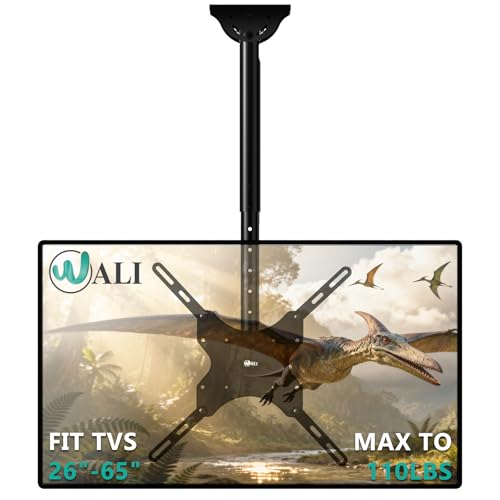
Best for: Buyers who specifically want a flip-down ceiling mount and flexible ceiling placement. WALI lists support for displays up to 65 inches and 110 pounds, with VESA patterns including 100 x 100, 200 x 100, 200 x 200, 300 x 300, and 400 x 400 mm.
Its height adjusts in 2-inch increments from 21.4 to 30.3 inches from the ceiling to the center of the mounting plate. The screen can tilt down 25 degrees, swivel 360 degrees, and rotate 3 degrees in either direction. The listed installation options include flat, sloped, and vaulted ceilings, as well as placement flat against the side of a joist. Limitation: The manufacturer says not to install it on drywall alone; confirm the TV’s VESA pattern and weight first.
USX STAR Adjustable Ceiling TV Mount

Best for: Buyers with a 26- to 65-inch TV who need adjustment options for an angled or sloped ceiling. The mount supports TVs up to 110 pounds and lists VESA compatibility from 50 x 50 mm through 400 x 400 mm.
Height adjusts from 21.14 to 29.02 inches. The mount tilts down up to 15 degrees and provides 360-degree rotation or swivel, with up to 90 degrees of swivel at the base for angled or sloped ceilings. That combination makes it a useful option when a straight-down installation would not point the screen toward the viewing area. Limitation: Check the precise VESA pattern, weight, and ceiling structure before purchase; the listed features do not specify a flip-down function.
Mount-It! MI-509B For TVs Up To 75 Inches

Best for: Buyers whose screen is larger than 65 inches but no bigger than 75 inches. This mount is listed for most 32- to 75-inch flat-panel TVs weighing up to 110 pounds, with VESA patterns from 200 x 200 mm to 600 x 400 mm. Its high-strength alloy-steel construction is safety-tested to three times the rated capacity, according to the supplied product details.
The stated use cases include home gyms, dining areas, covered patios, and bedrooms where wall placement is not practical. Choose it when screen size and a larger supported VESA range are priorities. Limitation: The supplied feature information does not specify height, tilt, or swivel adjustments, so compare those requirements before selecting it.
VIVO MOUNT-VC86-3 For Large Screens

Best for: Buyers mounting a larger 43- to 86-inch TV. VIVO lists a capacity of 132 pounds and compatibility with VESA patterns including 200 x 100, 400 x 400, and 600 x 400 mm. Its steel-and-aluminum construction is strength-tested, and the mount can position the display up to 3 feet from the ceiling.
The tilting mechanism supports flat and sloped or vaulted ceilings. Choose this model if your TV exceeds the size range of the 65-inch options above and its VESA pattern and weight meet the listed limits. Limitation: The supplied details do not state swivel range or a separate height-adjustment range, so verify that its positioning suits your room.
Buying Guide: How To Choose A Ceiling TV Mount
Will the mount fit your TV?
Compare the TV’s screen size, weight, and VESA mounting pattern with the mount’s listed limits. VESA is the spacing between the four mounting holes on the back of the television, measured in millimeters. A mount can support the right screen size but still fail to match the TV’s VESA pattern.
What ceiling structure can support it?
Plan to secure the mount to an appropriate structural support, such as a ceiling joist or suitable concrete or brick surface, following the product’s installation instructions. Do not assume drywall alone can support a hanging television. For sloped or vaulted ceilings, choose a mount whose listed features specifically address angled installation.
How much adjustment do you need?
Compare height range, tilt, and swivel based on where people will watch. A 360-degree swivel can redirect a screen around a room, while downward tilt can help aim it toward a lower viewing position. A flip-down design is a separate feature: not every ceiling mount folds down.
What else should you plan before installation?
Measure the distance from the ceiling to the desired screen position, and consider cable routing and clearance around the TV. Follow the mount’s instructions for assembly and installation. If the ceiling material, joist location, or combined load is uncertain, consult a qualified installer before drilling.
Frequently Asked Questions
Can a ceiling TV mount be installed on drywall alone?
Do not assume it can. The listed PERLESMITH and WALI instructions specifically warn against drywall-only installation. Use an appropriate structural mounting point and follow the selected mount’s instructions.
How do I check whether a mount fits my TV?
Check the television’s weight and VESA hole pattern, then compare both with the mount’s specifications. Also confirm that the TV’s screen size is within the stated range.
Can a ceiling mount work on a sloped ceiling?
Some models list support for angled ceilings. WALI and USX STAR specify features for sloped-ceiling installations, while VIVO lists compatibility with sloped or vaulted ceilings. Confirm the exact installation requirements for your chosen model.
Do all ceiling TV mounts flip down?
No. WALI is described as a flip-down mount, while PERLESMITH explicitly states that its model does not flip or fold down. Check the product features if that movement is essential.
What is the advantage of a ceiling TV mount?
A ceiling mount can free wall and floor space and place a screen where wall mounting is inconvenient. Its usefulness depends on secure structural installation and a viewing position that works for the room.