Best VESA Mount Monitor Stands for Ergonomic Setups
Choosing the right VESA mount monitor stand can improve comfort, boost productivity, and declutter your desk. The following picks emphasize sturdy construction, versatile adjustability, and broad compatibility with common monitor sizes and VESA patterns. Each option supports height adjustment, tilting, swiveling, and rotation to suit a wide range of tasks—from coding and design to everyday办公. Below is a quick look at five reliable choices, followed by a buying guide to help you compare features and make an informed purchase.
| Product | VESA | Weight Capacity | Mount Type |
|---|---|---|---|
| HUANUO Single Monitor Arm (B07T3KCQ94) | 75x75mm / 100x100mm | 4.4–19.8 lbs | Clamp / Grommet |
| HUANUO Dual Monitor Stand (B07T5SY43L) | 75x75mm / 100x100mm | 4.4–19.8 lbs per arm | Dual C-Clamp / Grommet |
| HUANUO Monitor Stand (B0CQL8DFLW) | 75x75mm / 100x100mm | Up to 44 lbs total | Freestanding |
| MOUNTUP MU0023 | 75x75mm / 100x100mm | Up to 17.6 lbs | Freestanding |
| Amazon Basics Desk Arm Stand (B07DHK5DHN) | 75x75mm / 100x100mm | Up to 22 lbs | Desk Arm Mount |
HUANUO Single Monitor Arm
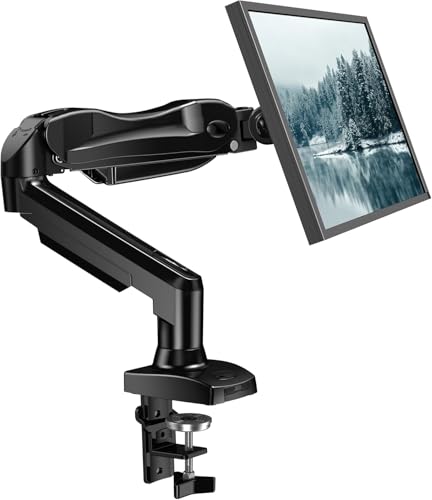
This HUANUO single monitor arm fits 13-32 inch monitors and supports 4.4–19.8 lbs, compatible with 75x75mm or 100x100mm VESA patterns. Designed for ergonomic use, it aims to improve viewing angles and reduce neck strain. It offers -50° to +85° tilt, ±90° swivel, and 360° rotation, with height adjustments up to 39.6 cm (approximately 15.6 inches). The unit emphasizes stability and ease of use, delivering a flexible, one-handed adjustment experience. Suitable for home offices and professional workspaces seeking smooth, tool-free customization.
HUANUO Dual Monitor Stand

This dual monitor stand holds two 13–32 inch displays with a combined weight capacity of 8.8–19.8 lbs per arm. It supports VESA patterns 75x75mm and 100x100mm and includes both a C-clamp and grommet base for secure desk mounting. Each arm provides -50° to +85° tilt, ±90° swivel, and 360° rotation, allowing landscapes or portraits. The design emphasizes stability and easy height adjustments, making it ideal for multi-monitor configurations in productive environments such as design studios or data analytics desks.
HUANUO Freestanding Monitor Stand (13–34 Inches)

Designed for larger, heavier monitors, this HUANUO freestanding stand supports 13–34 inch displays up to 44 lbs with VESA 75×75 or 100×100 patterns. It features a tall 17.24″ column, a tempered-glass base, and anti-slip pads to maximize stability on flat surfaces. Height adjusts from 9.27″ to 15.26″, with swivel, tilt, and rotation to optimize viewing comfort. Suitable for spaces where a freestanding solution is preferred or where desk mounting is not feasible.
MOUNTUP Single Monitor Stands MU0023

The MOUNTUP MU0023 freestanding monitor stand supports 13–32 inch screens with a maximum weight of 17.6 lbs per monitor (VESA 75×75/100×100). It offers +/- 30° tilt, +/- 25° swivel, +/- 180° rotation, and height adjustment up to 17.49 inches, enabling portrait or landscape orientations. The base and pole construction emphasize robust stability for daily use, with flexible positioning to align monitors with your eye level and desk setup.
Amazon Basics Single Monitor Stand

The Amazon Basics desk-mounted single-monitor stand supports 13–30 inch screens up to 22 pounds and desks 0.8–3.9 inches thick. It provides 360-degree rotation for landscape or portrait use, a height-adjustable arm from 7.9 to 14.2 inches, and a tilting range of -15 to +85 degrees. A built-in cable-management system helps keep cords organized, making it a practical choice for simple, reliable setups.
Buying Guide: Key Purchase Considerations
- Monitor compatibility: Verify monitor size, weight, and VESA pattern (75x75mm or 100x100mm) before purchasing. Some arms support larger or heavier displays, while others are best for lighter, smaller screens.
- Mounting style: Choose between freestanding, clamp, or grommet bases. Clamp and grommet bases generally offer a firmer setup for heavier displays, while freestanding units are easier to move and don’t require desk modification.
- Adjustment range: Consider tilt, swivel, and rotation capabilities, plus height adjustment. Extended ranges improve ergonomics by enabling eye-level alignment and reducing neck strain.
- Desk compatibility: If opting for clamps or grommets, ensure your desk thickness and construction allow secure mounting. For freestanding stands, check base stability and footprint.
- Build quality: Look for steel or heavy-duty materials, smooth joint movement, and anti-slip features on the base to prevent desk wobble during use.
- Cable management: Integrated channels or clips help maintain a tidy workspace and reduce cable clutter behind monitors.
- Future-proofing: If you anticipate upgrading to larger or heavier displays, select a stand with higher weight capacity and wider VESA support.
- Multi-monitor needs: For dual setups, confirm each arm’s weight rating and the ability to adjust independently to minimize shadowing or interference.
Across the selections, the HUANUO and MOUNTUP options emphasize robust adjustability and broader weight ranges, while the Amazon Basics model offers a straightforward, budget-friendly freestanding option. Dual-monitor configurations are best served by the HUANUO Dual stand or other dual-arm designs, whereas freestanding variants are advantageous when desk drilling is not desirable. Always validate compatibility with your specific display model before purchase to ensure optimal performance and stability.