Best Wall Hanging TV Mounts for Easy, Studless Setup in 2026
Choosing the right wall hanging TV mount can simplify living room layouts, reduce clutter, and improve viewing angles. This guide highlights five top no-stud and studless options that blend sturdy support with easy installation. Each option works with a wide range of screen sizes and VESA patterns, making it simple to upgrade or relocate your setup without wall damage. Read on for detailed product sections, a quick buying guide, and practical considerations to match your space and TV size.
Summary of selected products
| Product | Brand | Mount Type | TV Size Range | Weight Capacity |
|---|---|---|---|---|
| HangSmart TV Wall Mount NO Stud | Hang Smart TV | No Stud, Patented | 19″–100″ | Up to 150 lbs |
| Auoace No Stud TV Wall Mount | Auoace | No Stud, Wall Bar | 13″–55″ | Up to 99 lbs |
| Antimbee Studless Drywall Mount | Antimbee | Studless, Drywall | 13″–55″ | Up to 100 lbs |
| USX Mount Full Motion 42–90″ | USX MOUNT | Full Motion | 42″–90″ | Up to 132 lbs |
| AENTGIU Studless Wall Mount | AENTGIU | Studless, Drywall | 26″–55″ | Up to 80–110 lbs |
HangSmart No-Stud Wall Mount: Patented Easy Install

The HangSmart TV wall mount offers a fully DIY, no-stud installation that is ideal for renters or quick setups. It supports a broad range of flat screens and curved models, ensuring compatibility with popular brands. Built to securely hold large TVs, this mount accommodates up to 100 inches or 150 lbs, providing a robust option for bigger displays without drilling into walls.
Key aspects include wide TV compatibility, a patented no-stud design, and robust support for sizable screens. The installation process emphasizes simplicity, reducing the need for special tools or heavy construction work. This makes it a practical option for temporary placements or spaces where wall alterations are undesirable.
Considerations: Ensure your wall surface can accommodate the mount’s distribution of weight, and confirm the TV’s VESA pattern fits within the supported range. While designed for easy DIY setup, following the included hardware and instructions is essential to maintain stability and safety for larger TVs.
Auoace No-Stud TV Wall Mount: Quick, Studless Installation
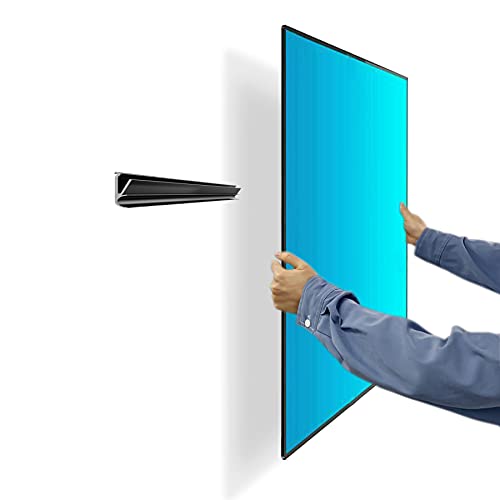
Auoace offers a studless, drywall-friendly wall mount designed for quick, no-drill installations. The kit includes all necessary hardware, with a straightforward English installation guide. It supports 13–55 inch TVs and patterns from 100x100mm to 400x400mm, making it a versatile choice for many living rooms or dorm setups.
Highlights include an uncomplicated, one-person setup process and compatibility with a wide range of brands. The mount is described as a universal monitor solution for larger computer displays as well, with a slim profile and minimal gap from the wall. This makes it a neat option for clean, modern aesthetics.
Important considerations: Check the TV’s weight and VESA pattern to ensure fit. While the wall plate is compact, confirm your wall type and studs alignment if you plan to move or upgrade the screen later.
Antimbee Studless Drywall Mount: Easy, Low-Profile Setup

The Antimbee studless mount emphasizes a low-profile design, extending only about 1 inch from the wall. It is built from heavy-duty aluminum alloy and supports TVs up to 100 lbs. The package includes a security cable for added protection and prevents drywall damage by avoiding studs drilling.
Compatibility spans 13–55 inch displays with VESA patterns up to 400x400mm, making it suitable for many mid-size TVs. Installation is designed for quick setup, with tools and hardware provided for a straightforward process. It’s a practical option for spaces where wall alterations are not feasible.
Buying considerations include ensuring wall strength to support the load, confirming weight limits, and verifying mounting hole alignment on the back of your TV before purchase.
USX Mount Full Motion: 42–90 Inch Flexibility

This USX Mount full-motion unit is designed for larger TVs, accommodating 42–90 inches with up to 132 lbs capacity. It supports a wide VESA range (200×100 up to 600×400) and is designed for 16-inch wood studs. The dual articulating arms enable a broad range of tilt and swivel, allowing optimal viewing angles and reduced glare.
Key benefits include strong construction, flexible positioning, and space-saving retract-and-extend capabilities. The mount allows post-installation leveling adjustments to ensure precise alignment after installation. It’s ideal for living rooms, media rooms, or home theaters where viewing angles are important.
Considerations: Verify that your wall studs are within the supported spacing and that your TV’s weight fits within the 132 lb limit. For very large TVs, double-check clearance at the sides when fully extended to ensure wall space is unobstructed.
AENTGIU Studless Wall Mount: Heavy Duty, Simple Install
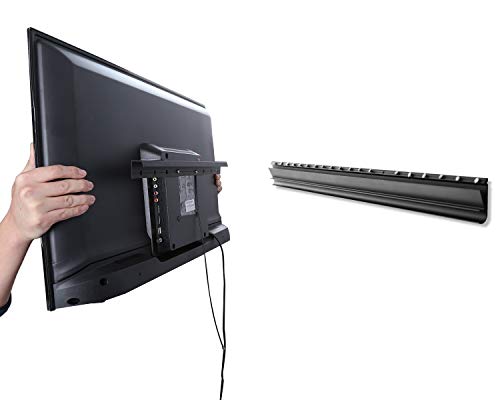
The AENTGIU studless design offers a lean, secure mounting solution for 26–55 inch TVs. It supports up to 110 lbs and has variant capacities depending on wall type (up to 80 lbs on drywall). The mount is described as sturdy, built from heavy-duty steel with security considerations such as a cable lock for added safety.
Features include a clean, low-profile profile with minimal gap, plus tilt to optimize viewing angles. It’s positioned as a practical option for living rooms or bedrooms where wall integrity and ease of installation matter most.
Practical considerations: Confirm wall type and curb potential indentation risk on older walls. If mounting on plaster or weaker drywall, ensure additional anchoring or backing for weight distribution is considered.
USX Mount Full Motion: 42–90 Inch, Dual Arm Comfort

Another USX MOUNT option focuses on full motion for 42–90 inch TVs with dual articulating arms. It supports up to 132 lbs and VESA patterns from 200x100mm to 600x400mm, with a maximum stud distance of 16 inches. The design emphasizes a wide viewing angle range and comprehensive tilt and swivel adjustments for comfort and healthful viewing posture.
Highlights include an extension capability of about 15 inches, space-saving profile, and a robust steel construction. Cable management aids help maintain a tidy setup, which complements modern living rooms and entertainment centers.
Take note: Check your wall structure, stud spacing, and ensure your TV’s mounting pattern aligns with the supported VESA range. If you plan to mount on a nonstandard wall, consider professional assessment for safety and stability.
Buying Guide: Key Purchase Considerations
- TV size and weight: Match the mount’s supported range to your TV’s dimensions and weight. Exceeding limits can compromise safety and performance.
- Wall type and mounting surface: Studless designs are ideal for drywall and plaster, but always verify load-bearing capacity. For brick or concrete walls, you may need different anchors or hardware.
- VESA compatibility: Confirm your TV’s VESA pattern matches the mount’s supported range (e.g., 100×100 up to 600×400).
- Mount motion and angles: Consider whether you need full motion (tilt, swivel, extend) or a fixed low-profile mount. Full-motion designs are best for seating position changes and glare reduction.
- Installation approach: No-drill or no-stud options simplify setup but ensure they provide adequate stability for your TV size. Include all hardware and clear guides for single-person installation if needed.
- Cable management: A tidy setup improves aesthetics and safety. Look for mounts with integrated cable management features.
- Durability and safety: Prioritize mounts with robust steel construction and security features, especially for larger or heavier TVs.
- After-sale support: Manufacturers that offer clear installation guidance and responsive support can be valuable if issues arise during mounting or future repositioning.
- Room aesthetics: A low-profile mount creates a clean wall line, while full-motion setups can be more visually prominent but offer better viewing flexibility.
These options represent a range of no-stud and studless approaches, balancing ease of installation with solid support for various TV sizes. When choosing, align the mount’s specifications with your screen model, wall type, and seating arrangement to optimize viewing comfort and room layout.